Asset Inventory Cron
Retrieves all assets and related metadata from Tenable for integration into third-party systems, collecting comprehensive data on each asset.
Sync Type: Full Synchronization
Requirements
- Log in to Tenable.io and go to the Create a service account page.
- Enter
Monad Serviceas the name. - Fill out the rest of the service account fields using your organization's usual process.
- Set the Role to
Scan Managerand click Finish.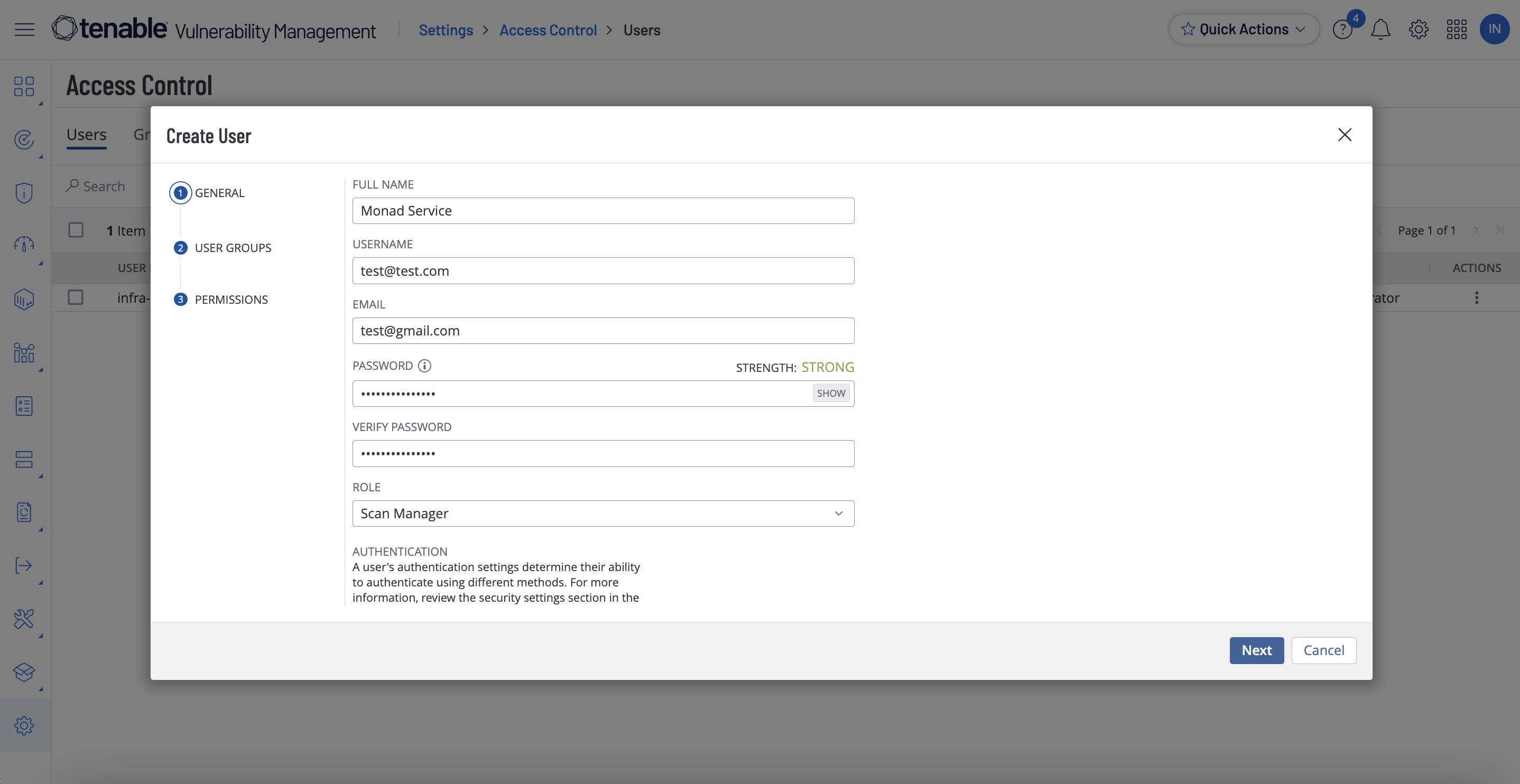
- Click the new service user and select API Keys on the left.
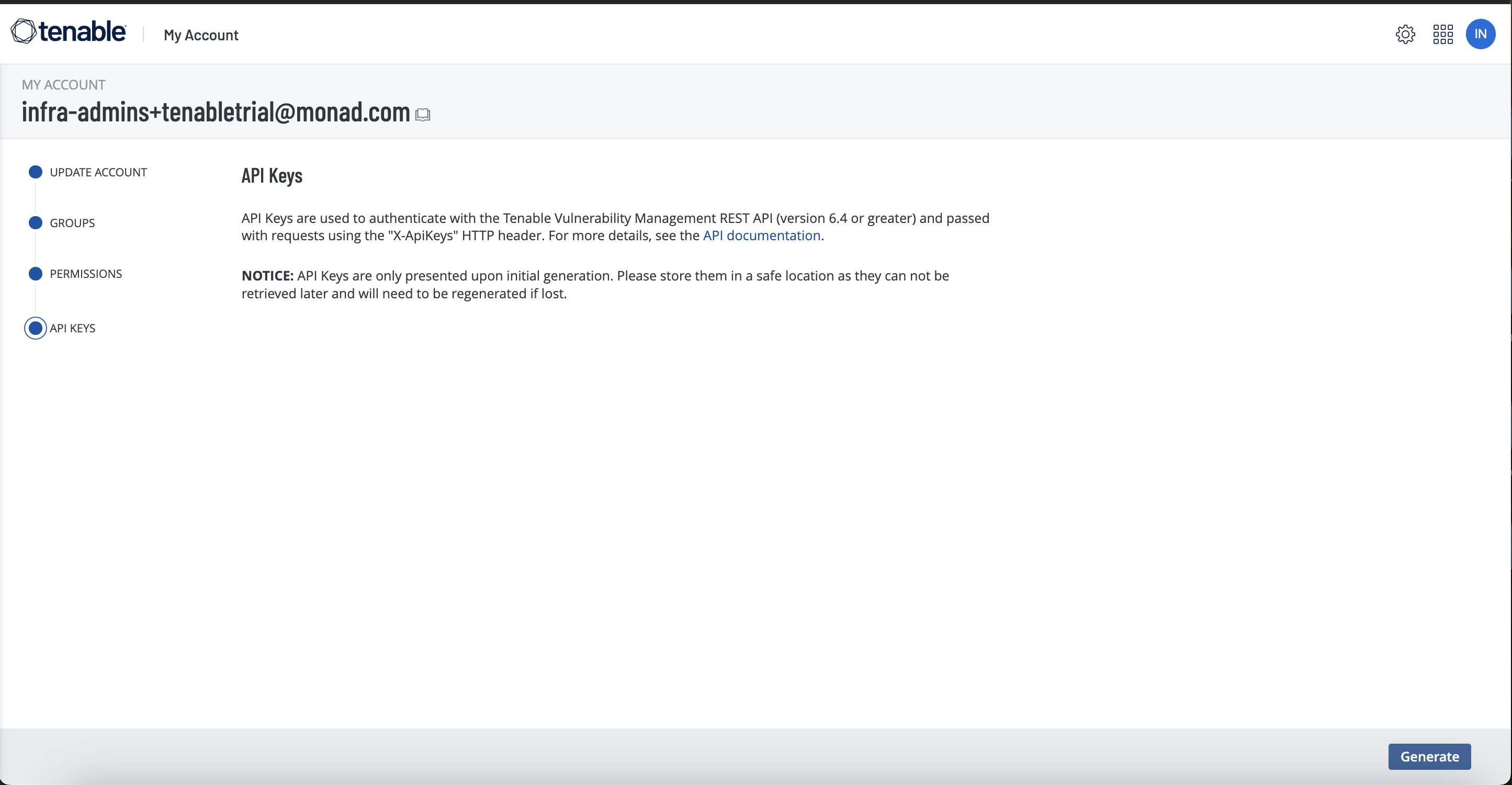
- Copy the access key and secret key. You'll need them when you set up the Monad connector.
Details
The same assets from Tenable Assets are returned but a full sync is performed based on a set cron schedule.
Configuration
The following configuration defines the input parameters. Each field's specifications, such as type, requirements, and descriptions, are detailed below.
Settings
| Setting | Type | Required | Description |
|---|---|---|---|
| Cron | string | Yes | Cron string for scheduling tasks. Ex: '0 0 * * *' for daily execution at midnight. |
Secrets
| Secret | Type | Required | Description |
|---|---|---|---|
| Access Key | string | Yes | Access Key for the Tenable API. This is required to authenticate requests. |
| Secret Key | string | Yes | Secret Key for the Tenable API. This is required to authenticate requests. |
OCSF Conversion
The following JQ transformation converts Tenable Asset data to OCSF Version 1.1 compliant format.
JQ Transformation
{
  # Static fields
  category_uid: 5,                    # Discovery
  class_uid: 5001,                    # Device Inventory Info
  activity_id: 2,                     # Collect
  type_uid: 500102,                   # Device Inventory Info: Collect
  severity_id: 1,                     # Informational

  # Dynamic time field - remove milliseconds and convert to epoch
  time: (
    if .updated_at then
      .updated_at | sub("\\.[0-9]+Z$"; "Z") | fromdateiso8601
    else
      now
    end
  ),

  # Device object with all available fields
  device: {
    type_id: 0,                       # Unknown
    uid: .id,
    hostname: (
      if (.hostnames | length > 0) then
        .hostnames[0]
      else
        ""
      end
    ),
    ip: (
      if (.ipv4s | length > 0) then
        .ipv4s[0]
      else
        null
      end
    ),
    mac: (
      if (.mac_addresses | length > 0) then
        .mac_addresses[0]
      else
        null
      end
    ),
    # Additional fields
    first_seen_time: (
      if .first_seen then
        .first_seen | sub("\\.[0-9]+Z$"; "Z") | fromdateiso8601
      else
        null
      end
    ),
    last_seen_time: (
      if .last_seen then
        .last_seen | sub("\\.[0-9]+Z$"; "Z") | fromdateiso8601
      else
        null
      end
    ),
    network_interfaces: (
      if (.network_interfaces | length > 0) then
        .network_interfaces
      else
        []
      end
    ),
    region: (
      if .aws_region then
        .aws_region
      else
        null
      end
    ),
    type: (
      if (.system_types | length > 0) then
        .system_types[0]
      else
        null
      end
    ),
    domain: (
      if (.fqdns | length > 0) then
        .fqdns[0]
      else
        null
      end
    ),
    os: (
      if (.operating_systems | length > 0) then
        .operating_systems[0]
      else
        null
      end
    ),
    created_time: (
      if .created_at then
        .created_at | sub("\\.[0-9]+Z$"; "Z") | fromdateiso8601
      else
        null
      end
    ),
    modified_time: (
      if .updated_at then
        .updated_at | sub("\\.[0-9]+Z$"; "Z") | fromdateiso8601
      else
        null
      end
    ),
    zone: (
      if .network_name then
        .network_name
      else
        null
      end
    )
  },

  # Static metadata
  metadata: {
    version: "1.1.0",
    product: {
      vendor_name: "Tenable"
    }
  }
}
OCSF Mapping Details
The JQ transformation converts Tenable Assets to OCSF Version 1.1 with the following key mappings:
Core Fields
- Category UID: Set to 5 (Discovery)
- Class UID: Set to 5001 (Device Inventory Info)
- Activity ID: Set to 2 (Collect)
- Type UID: Set to 500102 (Device Inventory Info: Collect)
- Severity ID: Set to 1 (Informational)
- Time: Extracted from the asset's
updated_atfield- Strips milliseconds from the ISO timestamp
- Converts to Unix timestamp format using
fromdateiso8601
Cloud Provider Detection
The transformation includes logic to identify the cloud provider based on available fields:
- Sets to "AWS" if any AWS-specific fields are present:
- aws_owner_id
- aws_region
- aws_vpc_id
- aws_ec2_instance_id
- Sets to "Azure" if Azure-specific fields are present:
- azure_vm_id
- azure_resource_id
- Sets to "GCP" if GCP-specific fields are present:
- gcp_project_id
- gcp_zone
- gcp_instance_id
- Defaults to "Unknown" if no cloud-specific fields are found
Device Information
- Type ID: Set to 0 (Unknown)
- UID: Maps directly from the asset's
idfield - Hostname: Takes the first hostname from the
hostnamesarray, defaults to empty string if none exists - IP: Takes the first IPv4 address from the
ipv4sarray, defaults to null if none exists - MAC: Takes the first MAC address from the
mac_addressesarray, defaults to null if none exists
Metadata
- Version: Set to "1.0.0"
- Product: Includes vendor_name set to "Tenable"
Customization
The transformation serves as a starting point and can be modified to accommodate specific requirements while maintaining OCSF compliance. The mapping prioritizes essential asset information and cloud provider detection while providing fallback values for optional fields.
Related Articles
- https://developer.tenable.com/reference/exports-assets-download-chunk
- https://docs.tenable.com/vulnerability-management/Content/Settings/access-control/CreateAUserAccount.htm
- https://developer.tenable.com/reference/exports-assets-request-export
- https://developer.tenable.com/reference/exports-assets-export-status
- https://developer.tenable.com/reference/exports-assets-download-chunk