Issues
Collects and ingests issues from a GitLab project using the GitLab Issues API.
Details
The GitLab Issues input allows you to collect and ingest issue data from a GitLab project using the GitLab Issues API. This input supports extensive filtering options, state-based tracking, and scheduled execution to automatically monitor issues across your GitLab instance.
Key Features
- Comprehensive Filtering: Filter issues by state, labels, assignees, authors, milestones, and more
- State Tracking: Maintains state to incrementally collect new issues based on last updated timestamps
- Flexible Scheduling: Run on custom cron schedules to match your monitoring needs
- Multi-Project Support: Can collect from specific projects or all accessible projects
- Rich Metadata: Collects complete issue data including comments count, time stats, and task completion
- GitLab.com and Self-Hosted: Works with both GitLab.com and self-hosted GitLab instances
Data Collection Strategy
The input uses state tracking to efficiently collect issues:
- On first run, collects all issues matching your filter criteria
- On subsequent runs, collects only issues updated after the last successful run
- Sorts issues by date they are updated in ascending order to ensure proper state tracking
- Updates the state timestamp with the latest issue's update time
Prerequisites
Before setting up the GitLab Issues input, you need:
- GitLab Access: Access to a GitLab instance (GitLab.com or self-hosted)
- Personal Access Token: A GitLab Personal Access Token with appropriate permissions
- API Permissions: The token must have
read_apiscope to access issues
Creating a Personal Access Token
- Log in to your GitLab instance
- Go to Edit Profile > Access Tokens
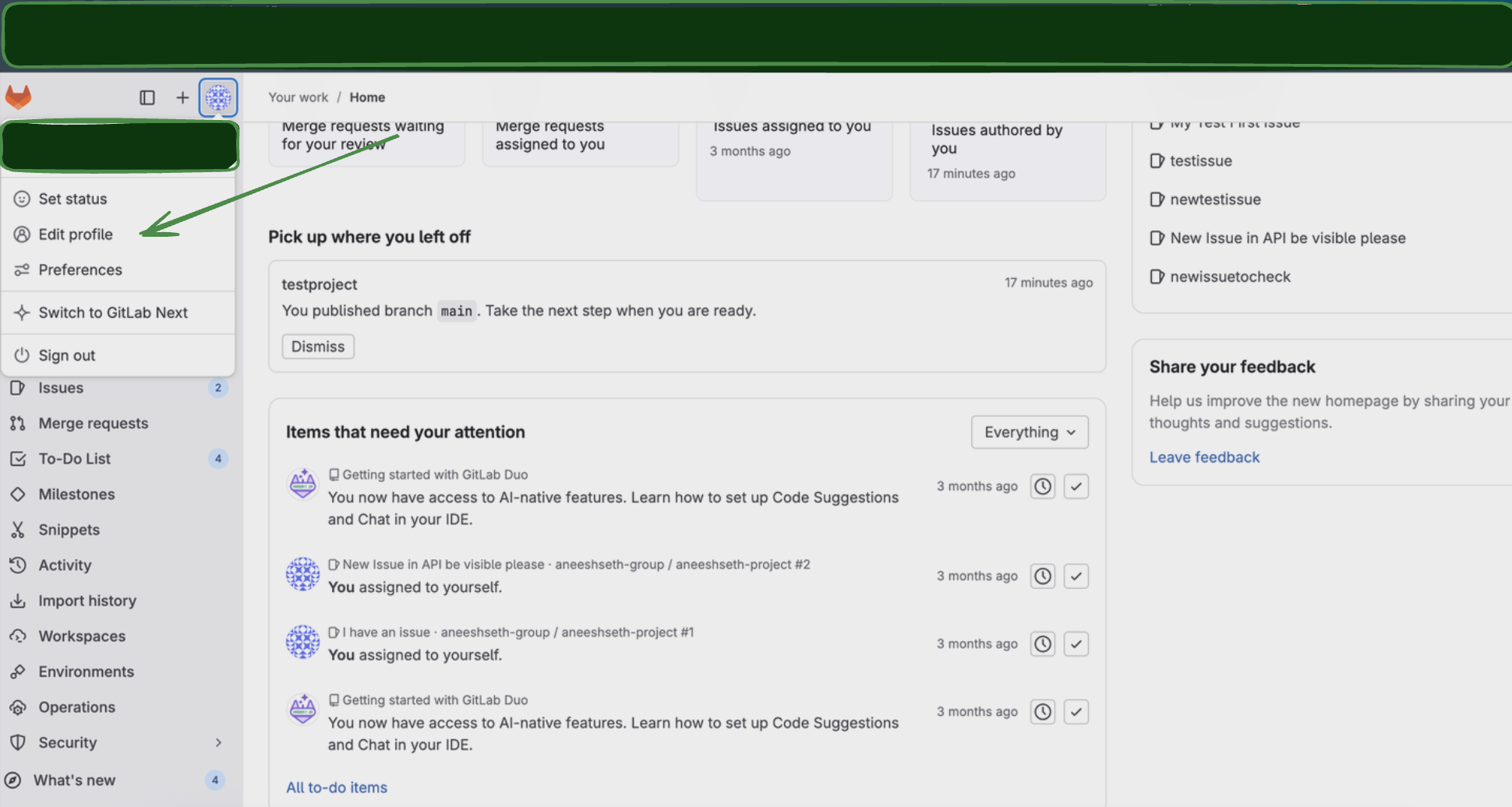
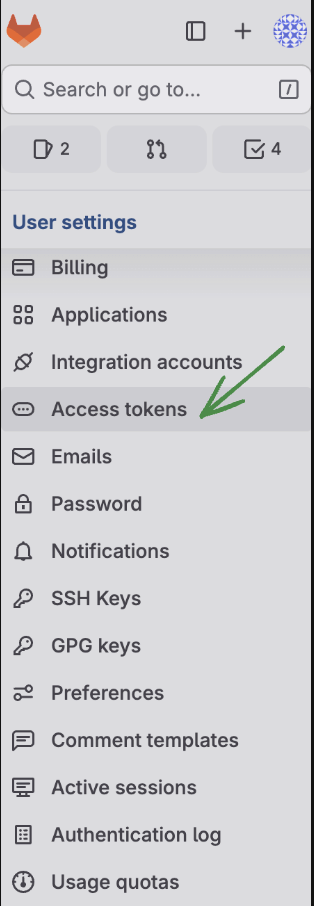
- Click Add new token
- Configure the token:
- Name: Enter a descriptive name (e.g., "Monad Issues Connector")
- Expiration date: Set an appropriate expiration date
- Scopes: Select
read_apiscope.
- Click Create personal access token
- Important: Copy the token value immediately as it won't be shown again
Configuration
Settings
| Setting | Type | Required | Default | Description |
|---|---|---|---|---|
| Project ID | string | Yes | - | Project ID to get issues for |
| GitLab URL | string | Yes | https://gitlab.com | GitLab URL for Custom-Urls when self hosting. Defaults to https://gitlab.com. |
| State | string | No | all | Filter issues by state. Options: opened, closed, all |
| With Label Details | boolean | No | false | If true, the response returns more details for each label in labels field: :name, :color, :description, :description_html, :text_color. Default is false. |
| Confidential | boolean | No | false | If true, only show confidential issues |
| Issue Type | string | No | - | Filter by issue type. Options: issue, incident, test_case, task |
| Backfill Start Time | string | No | The date to start fetching data from. If not specified, no past records will be fetched. |
Secrets
| Secret | Type | Required | Description |
|---|---|---|---|
| Personal Access Token | string | Yes | GitLab Personal Access Token with read_api scope |
API Reference
This input uses the GitLab Issues API endpoints:
- Primary Endpoint:
GET /projects/<project_id>/issues- Lists all issues the authenticated user has access to from the project id given. - Rate Limiting: Respects GitLab's API rate limits.
- Authentication: Uses Bearer token authentication with Personal Access Tokens.
Troubleshooting
Common Issues
-
No Issues Returned
- Check that
scopeis set toallif you want to see all accessible issues - Verify your Personal Access Token has the correct permissions
- Ensure you have access to the GitLab instance and projects
- Check that
-
Authentication Errors
- Verify your Personal Access Token is valid and not expired
- Check that the token has
read_apiscope. - Ensure the token belongs to a user with access to the desired project.
Related Articles
- GitLab Issues API Documentation
- GitLab Personal Access Tokens
- GitLab Issue Management
- GitLab API Rate Limits
Sample Record
{
  "_links": {
    "award_emoji": "https://gitlab.com/api/v4/projects/57549/issues/87/award_emoji",
    "notes": "https://gitlab.com/api/v4/projects/91360/issues/96/notes",
    "project": "https://gitlab.com/api/v4/projects/71165",
    "self": "https://gitlab.com/api/v4/projects/30477/issues/87"
  },
  "assignee": {
    "avatar_url": "https://www.gravatar.com/avatar/7b270be4-dd81-27ab-0f48-77a8715669a7",
    "id": "78815",
    "name": "Sarah Jones",
    "state": "inactive",
    "username": "Jane Jones.Alice Smith",
    "web_url": "https://gitlab.com/Jane Brown.Peter Miller"
  },
  "assignees": [
    {
      "avatar_url": "https://www.gravatar.com/avatar/87d48e25-a470-c8e0-5afe-9cfe5a5b2dbf",
      "id": "81069",
      "name": "John Brown",
      "state": "inactive",
      "username": "Tom Brown.Tom Jones",
      "web_url": "https://gitlab.com/Jane Jones.John Brown"
    }
  ],
  "author": {
    "avatar_url": "https://www.gravatar.com/avatar/84915db0-8d58-23ac-1df2-9caee17f71c5",
    "id": "96411",
    "name": "John Jones",
    "state": "inactive",
    "username": "Sarah Jones.Tom Miller",
    "web_url": "https://gitlab.com/Jane Jones.Sarah Smith"
  },
  "closed_at": "2024-12-15T10:30:00Z",
  "closed_by": "null",
  "confidential": "true",
  "created_at": "2025-08-11T23:46:35.770002Z",
  "description": "Bug report for login functionality",
  "discussion_locked": "false",
  "downvotes": "0",
  "due_date": "2024-12-31T00:00:00Z",
  "epic": "null",
  "epic_issue_id": "584",
  "external_id": "EXT-1002",
  "health_status": "on_track",
  "id": "732807",
  "iid": "293",
  "issue_link_id": "4797",
  "issue_type": "test_case",
  "iteration": "null",
  "label_details": "null",
  "labels": [
    "enhancement",
    "minor"
  ],
  "merge_requests_count": "0",
  "milestone": "v2.0.0",
  "moved_to_id": "797",
  "project_id": "32582",
  "references": {
    "full": "product-group/my-project#382",
    "relative": "#450",
    "short": "#118"
  },
  "service_desk_reply_to": "support@example.com",
  "state": "closed",
  "subscribed": "false",
  "task_completion_status": {
    "completed_count": "2",
    "count": "0"
  },
  "time_stats": {
    "human_time_estimate": "1w 2d",
    "human_total_time_spent": "1w",
    "time_estimate": "18805",
    "total_time_spent": "42381"
  },
  "title": "Improve API performance",
  "updated_at": "2025-08-11T23:46:35.770477Z",
  "upvotes": "5",
  "user_notes_count": "4",
  "web_url": "https://gitlab.com/product-group/api-service/-/issues/443",
  "weight": "6"
}