Org Events
Returns all events for the specified organization. Events identify significant database, billing, or security activities or status changes.
Sync Type: Incremental
Requirements
Before you connect Monad to MongoDB, you have to pick your authentication method: Service Accounts (Preview feature in MongoDB) or API Keys — Read More.
- To perform the following actions, you must have Organization Owner access to Atlas.
API Keys:
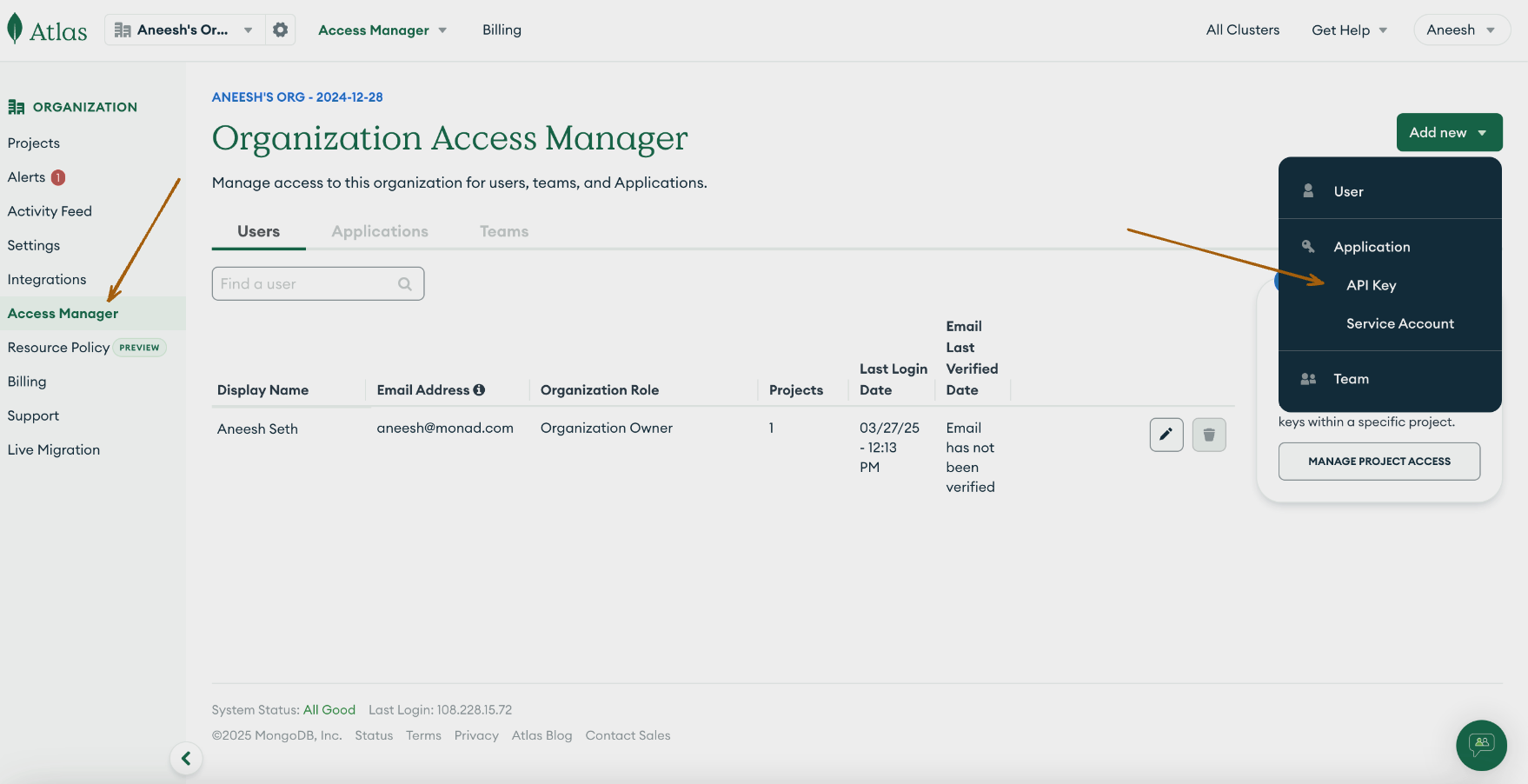
- In Atlas, go to the Organization Access Manager page. If it's not already displayed, select your desired organization from the Organizations menu in the navigation bar.
Do one of the following steps:
-
Select Organization Access from the Access Manager menu in the navigation bar.
-
Click Access Manager in the sidebar.

The Organization Access Manager page displays.
- Click Add new API Key.
- Enter the API Key Information.
- In the Organization Permissions menu, select the
Organization Memberpermission for the API key.
-
Click Next.
-
Copy and save the Public Key. The public key acts as the username when making API requests.
-
Copy and save the Private Key. The private key acts as the password when making API requests.
-
Add an API Access List Entry.
-
Click Add Access list Entry.
-
Enter an IP address or CIDR block from which you want Atlas to accept API requests for this API Key.
-
You can also click Use Current IP Address if the host you are using to access Atlas will also make API requests using this API Key.
-
Click Save.
- Click Done.
Service Account (Preview Feature):
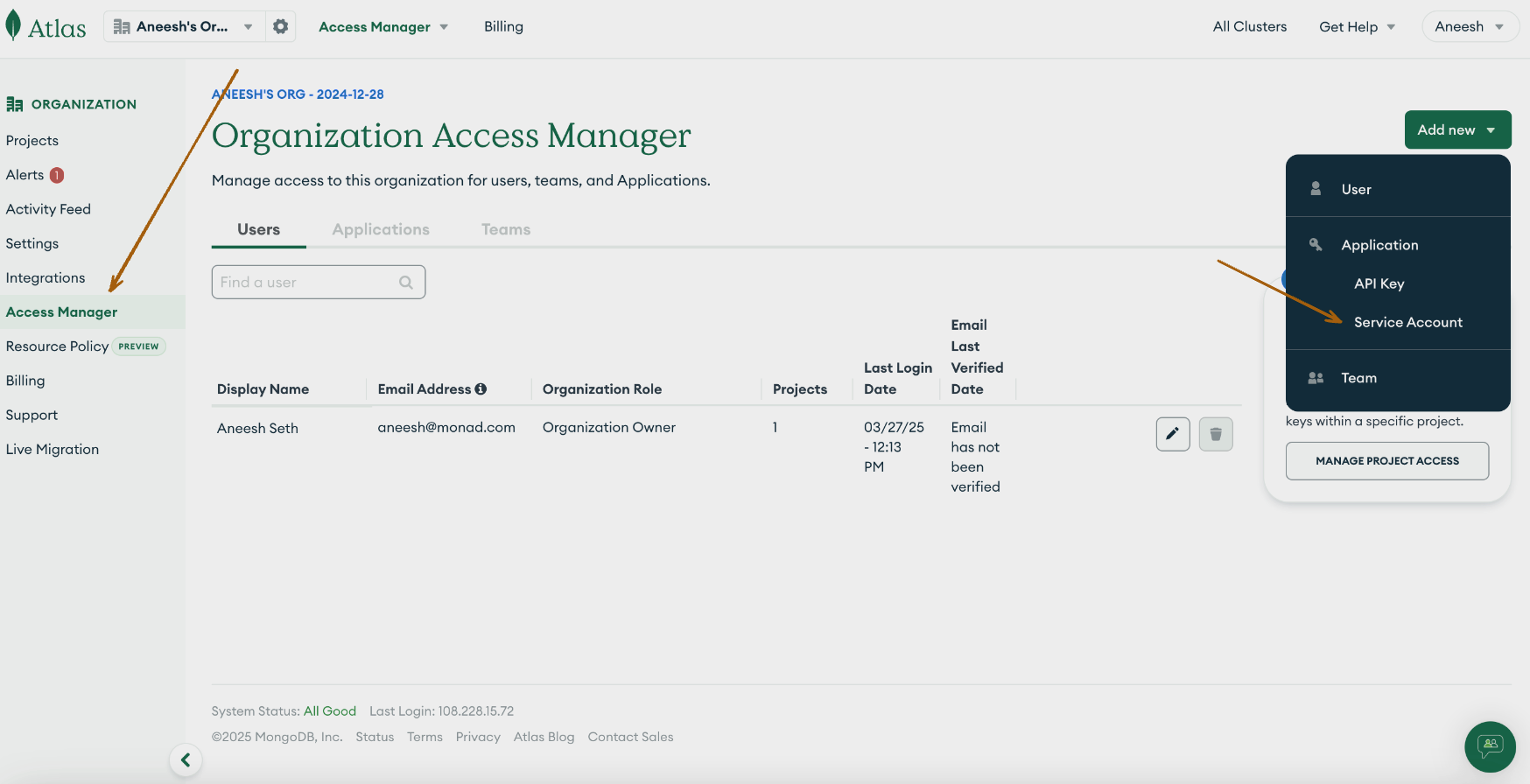
- In Atlas, go to the Organization Access Manager page. If it's not already displayed, select your desired organization from the Organizations menu in the navigation bar.
Do one of the following steps:
-
Select Organization Access from the Access Manager menu in the navigation bar.
-
Click Access Manager in the sidebar.
The Organization Access Manager page displays.
- Click Add new Service Account.
- Enter the service account information.
- From the Organization Permissions menu, select the
Organization Memberpermission for service account.
- Click Create.
- Copy and save the Client Secret. The client secret acts as the password when creating access tokens.
Click Save.
Details
Monad uses the minDate on the API to determine what events to display. This field is updated every time a request to get event logs is successful with the last time a request to get the logs was initiated. If this was the first time requesting for event logs, a full sync of the data is performed.
Configuration
The following configuration defines the input parameters. Each field's specifications, such as type, requirements, and descriptions, are detailed below.
Settings
None.
Secrets
| Secret | Type | Required | Description |
|---|---|---|---|
| Client ID | string | No | Client ID for the MongoDB API. This is required to authenticate requests. |
| Client Secret | string | No | Client Secret for the MongoDB API. This is required to authenticate requests. |
| Public Key | string | No | Public Key for the MongoDB API. This is used for digest based authentication for requests. |
| Private Key | string | No | Private Key for the MongoDB API. This is used for digest based authentication for requests. |
| Backfill Start Time | string | No | The date to start fetching data from. If not specified, no past records will be fetched. |
Note: If both authentication credentials (Client ID and Client Secret and Public Key & Private Key) are provided, Monad will default to using the Client ID & Secret.
Custom Schema Handling
If the source data doesn't align with any of the OpenSecurityControlFramework (OSCF) schemas, you can create a custom transformation using our JQ transform pipeline. For example:
{
  metadata: {
    schema_version: "1.0.0",
    custom_framework: "my_framework"
  },
  controls: .[]
}
For more information on JQ and how to write your own JQ transformations see the JQ docs here.
If you believe this data source should be included in the standard OSCF schema set, please reach out to our team at support@monad.com. We're always looking to expand our coverage of security control frameworks based on community needs.
Related Articles
- https://www.mongodb.com/docs/atlas/configure-api-access/#std-label-atlas-admin-api-access
- https://www.mongodb.com/docs/atlas/reference/api-resources-spec/v2/
Sample Record
{
  "apiKeyId": "d83410e4-5ef1-4e6b-4b12-1e9d60f8dd32",
  "created": "2025-08-11T23:46:46.579302Z",
  "eventTypeName": "USER_ADDED",
  "groupId": "38b802e2-71fd-e5fb-a3a3-e12a219415b3",
  "id": "d4ae870a-3219-0bd9-db47-4437934f3fb2",
  "isGlobalAdmin": true,
  "links": [
    {
      "href": "https://cloud.mongodb.com/api/atlas/v2",
      "rel": "self"
    }
  ],
  "orgId": "0185a92b-ea7f-8e0f-63d0-74ec48ffaa28",
  "publicKey": "Peter Brown@mongodb.com",
  "raw": {
    "_t": "USER_AUDIT",
    "alertConfigId": "02d799e4-1acf-0310-eb3e-4e10ebbcb9fc",
    "cid": "41b40720-1c9c-5130-2b0f-8f7a3d2917d3",
    "cre": "2025-08-11T23:46:46.579454Z",
    "description": "Alert Acknowledged",
    "gn": "Staging Project",
    "id": "754ec016-f757-9f5f-4987-a3082814b6f3",
    "orgId": "66c98daa-93fc-6a58-2275-0b4147c0576d",
    "orgName": "Platform Team",
    "severity": "ERROR"
  },
  "remoteAddress": "194.236.151.210",
  "userId": "1f02b7d3-18be-9e91-3748-672ab69c7caf",
  "username": "Tom Brown@mongodb.com"
}