Enterprise Audit Logs
Retrieves repository, permission, and authentication activity logs from GitHub Enterprise.
Sync Type: Incremental
Requirements
Before configuring this input, you need to:
-
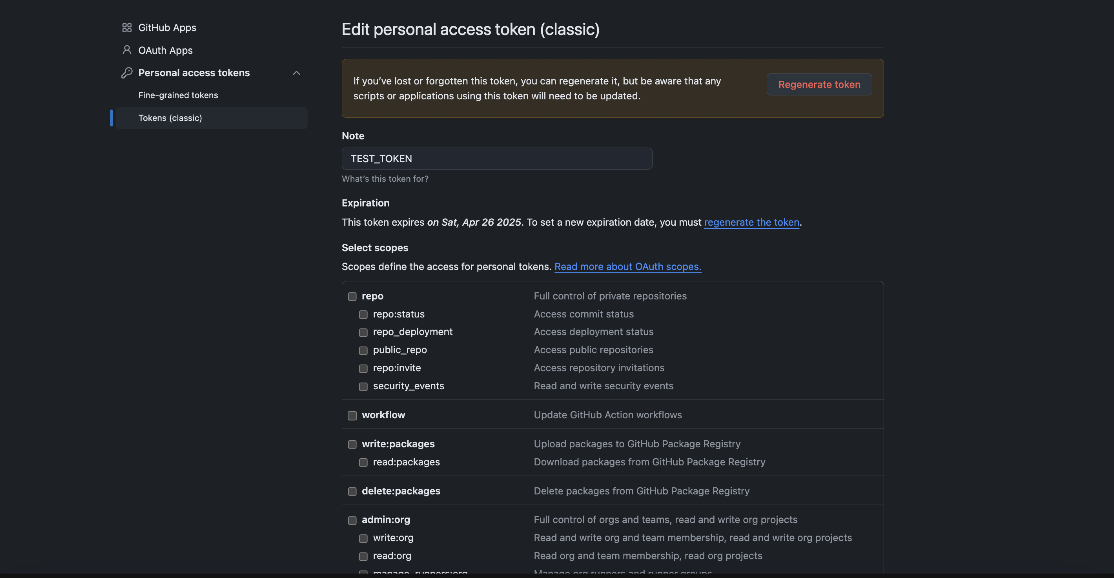
Create a Personal Access Token (PAT) — GitHub docs.
- Go to your GitHub settings
- Navigate to Developer settings > Personal access tokens > Tokens (classic)
- Click "Generate new token (classic)"
- Select the
read:audit_logscope - Copy and securely store the generated token
-
Required Permissions:
- You must be an enterprise admin to access enterprise audit logs
- The PAT must have the
read:audit_logscope

Configuration
Settings
| Setting | Type | Required | Default | Description |
|---|---|---|---|---|
| enterprise | string | Yes | - | Your GitHub enterprise slug or ID |
| include | string | Yes | "all" | Type of events to include: "web" (non-git events), "git" (git events), or "all" |
| actor | string | No | - | Filter by the username that initiated the action |
| actions | array | No | - | Filter by specific actions or action patterns (e.g., ["repo.create", "team.*"]) |
| organization | string | No | - | Filter by organization name |
| repository | string | No | - | Filter by repository (format: org-name/repo-name) |
| country | string | No | - | Filter by actor's country code (e.g., "US") |
| user | string | No | - | Filter by the username that was affected by the action |
| backfill start time | string | No | The date to start fetching data from. If not specified, no past records will be fetched. |
Secrets
| Secret | Type | Required | Description |
|---|---|---|---|
| personal_access_token | string | Yes | GitHub Personal Access Token with read:audit_log scope |
Important Notes About Filtering
When using filters, be aware that:
-
Missing Data Fields: Not all audit log entries contain all fields. If you filter on a field that isn't present in a record, that record will be excluded. For example:
- If you filter by
country: "US"but an event doesn't include actor location data, that event won't be captured - Some events may not have an affected user, so filtering by
userwould exclude those events
- If you filter by
-
Action Patterns: The
actionsfilter supports both exact matches and wildcards:- Exact match:
"repo.create","team.add_member" - Wildcard:
"repo.*"(all repository events),"team.*"(all team events)
- Exact match:
-
Case Sensitivity: Some fields are case sensitive:
- Organization and repository names are case sensitive
- Country codes are case insensitive (both "US" and "us" work)
Limitations
- API rate limits apply (1,750 requests per hour per user/token)
- Maximum of 100 results per page
- Secondary rate limits may apply for high-frequency requests
- Historical data availability depends on your GitHub Enterprise retention settings
Troubleshooting
Common issues and solutions:
1. Rate Limit Errors
- The input automatically handles rate limiting by waiting for the reset period
- You'll see logs indicating the wait time when rate limits are hit
- It is possible that the speed at which you generate records exceed how fast Monad can ingest them due to Github's rate limits. In these scenarios you may wish to filter more granular.
2. Authentication Errors
- Verify your PAT has the
read:audit_logscope - Ensure the PAT hasn't expired
- Confirm you have enterprise admin access
3. No Data
- Check if your filters might be too restrictive
- Verify that the enterprise slug/ID is correct
- Ensure there are audit events in the time range you're querying
Sample Record
{
  "@timestamp": 1754956009902,
  "_document_id": "97b9a650-f761-bb7b-7c7d-d268c12e780a",
  "action": "pull_request.create_review_request",
  "actor": "John Jones",
  "actor_id": 490095,
  "actor_is_bot": false,
  "actor_location": {
    "country_code": "GB"
  },
  "business": "test-org",
  "business_id": 96281,
  "created_at": 1754956009902,
  "operation_type": "create",
  "org": "example-org",
  "org_id": 73860966,
  "public_repo": false,
  "pull_request_id": 2199799492,
  "pull_request_title": "Hotfix",
  "pull_request_url": "https://github.com/example-org/infra/pull/930",
  "repo": "test-org/infra",
  "repo_id": 880125875,
  "user": "Alice Miller",
  "user_agent": "Mozilla/5.0 (Macintosh; Intel Mac OS X 10_12_6) AppleWebKit/537.36 (KHTML, like Gecko) Chrome/61.0.3163.100 Safari/537.36",
  "user_id": 698322
}