

CrowdStrike Event Stream
Streams Falcon Insight XDR detection and incident summaries plus Falcon platform audit events in real time via the CrowdStrike Event Streams API.
Every event type published to your Falcon Event Streams datafeed is ingested, including endpoint (EPP), XDR, and identity protection (IDP) detection summaries, incident summaries, and Falcon console audit events such as AuthActivityAuditEvent and UserActivityAuditEvent.
This input applies no event-type filter; use a pipeline condition or transform on metadata.eventType to route or drop specific event types.
Sync Type: Streaming
Requirements
- Before you connect Monad to CrowdStrike, you need a Client ID and Client Secret. Log in to your CrowdStrike portal, and under Support & Resources, click on 'API Client and Keys' to create your credentials.
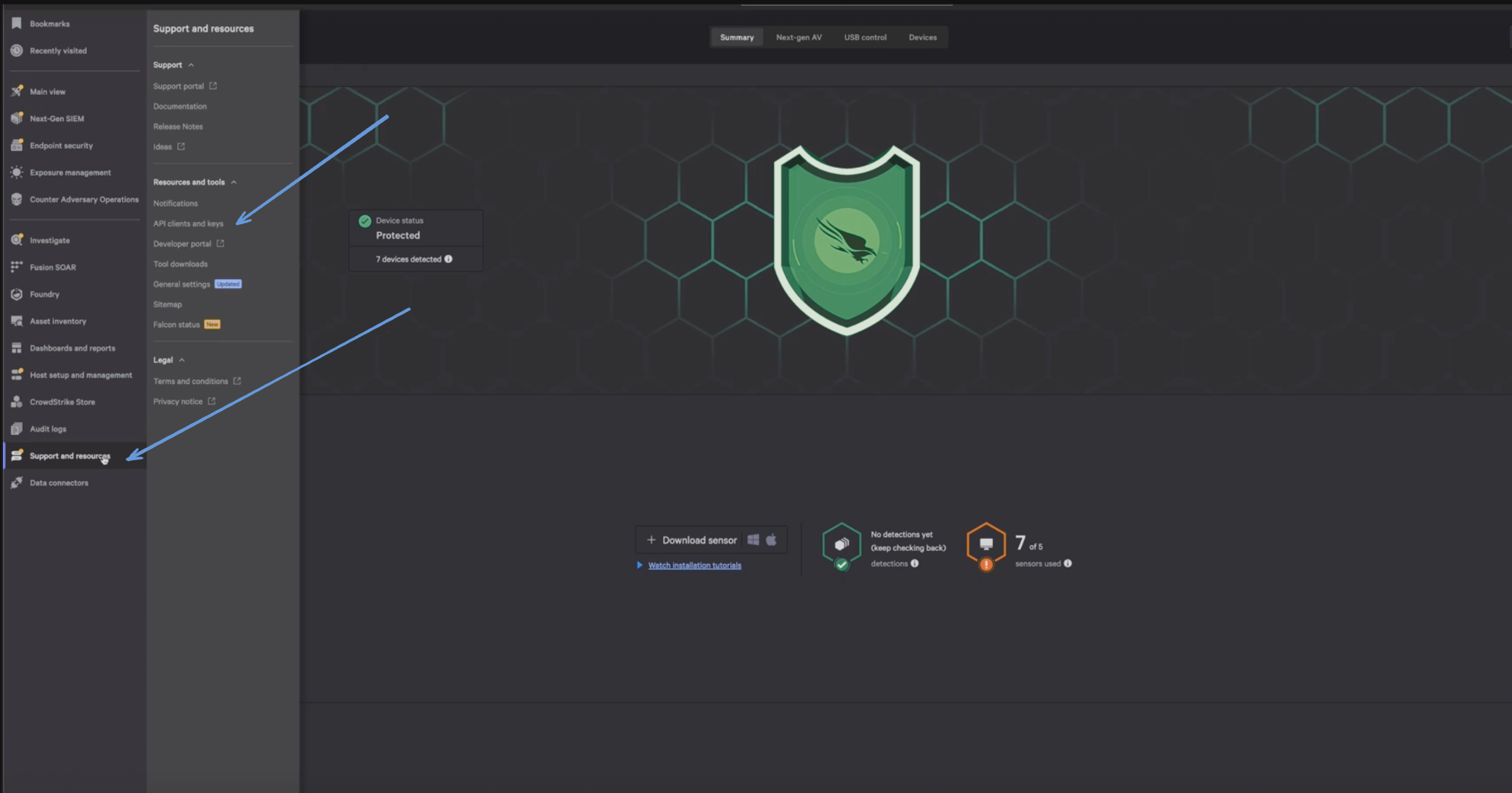
- Enter a Client Name, Description and API Scopes to define the API client. Ensure read roles for Event Streams are enabled.
- Click Done.
- Copy the ClientID and ClientSecret key. You'll need them when you set up the Monad connector.
Details
Monad keeps its own record of its position in each CrowdStrike event stream and resumes from that position after a restart or reconnect. There is no Backfill setting. On the first run, each stream starts from CrowdStrike's default position for a new consumer; see the CrowdStrike documentation for details.
App Name can be at most 26 characters, because Monad appends a unique 6-character ID to it. The resulting name is fixed when the input first runs; changing App Name later doesn't change the consumer name CrowdStrike sees.
Configuration
The following configuration defines the input parameters. Each field's specifications, such as type, requirements, and descriptions, are detailed below.
Settings
| Setting | Type | Required | Default | Description |
|---|---|---|---|---|
cloud | string | Yes | autodiscover | Your cloud type for CrowdStrike. Ex: 'autodiscover', 'us-1', 'us-2', 'eu-1', 'us-gov-1'. Allowed values: autodiscover, us-1, us-2, eu-1, us-gov-1. |
member_cid | string | No | - | In environments where an entity (like an MSSP) manages security for multiple clients, each client is typically assigned a unique CID. This identifier allows the managing entity to access and operate within the specific customer's environment. This is crucial for scenarios where operational isolation between different clients' data and configurations is necessary. |
app_name | string | Yes | - | The application name the connector uses to connect to the CrowdStrike data stream. A unique 6 character ID is appended to ensure uniqueness |
use_synthetic_data | bool | No | false | Generate synthetic data for testing, instead of connecting to a real data source. Defaults to an hourly cron schedule for cron-based inputs. |
Secrets
| Secret | Type | Required | Description |
|---|---|---|---|
client_id | secret | Yes | Client ID for the CrowdStrike API. This is required to authenticate requests. |
client_secret | secret | Yes | Client Secret for the CrowdStrike API. This is required to authenticate requests. |
Sample Record
Code
Sync frequency
This input consumes from the source queue or subscription, ingesting records at whatever rate the source delivers them rather than on a fixed poll. See Input Sync Frequency for details.
Community transforms
The Monad Transforms Repository has ready-made transforms for this input. Import one into your organization, then add it to a pipeline after this input.
| Format | Transform |
|---|---|
| OCSF v1.9.0 | CrowdStrike Event Stream Detections to OCSF v1.9.0 |
| ECS v9.5.0 | CrowdStrike Event Stream Detections to ECS v9.5.0 |
| CEF | CrowdStrike Event Stream Detections to CEF |
CEF transforms emit an intermediate record; add the CEF Serializer transform after one to produce the CEF:0 string.