Retrieves detailed asset data on devices managed by CrowdStrike Falcon Spotlight for asset visibility and vulnerability mapping.
Sync Type: Full Synchronisation
Requirements
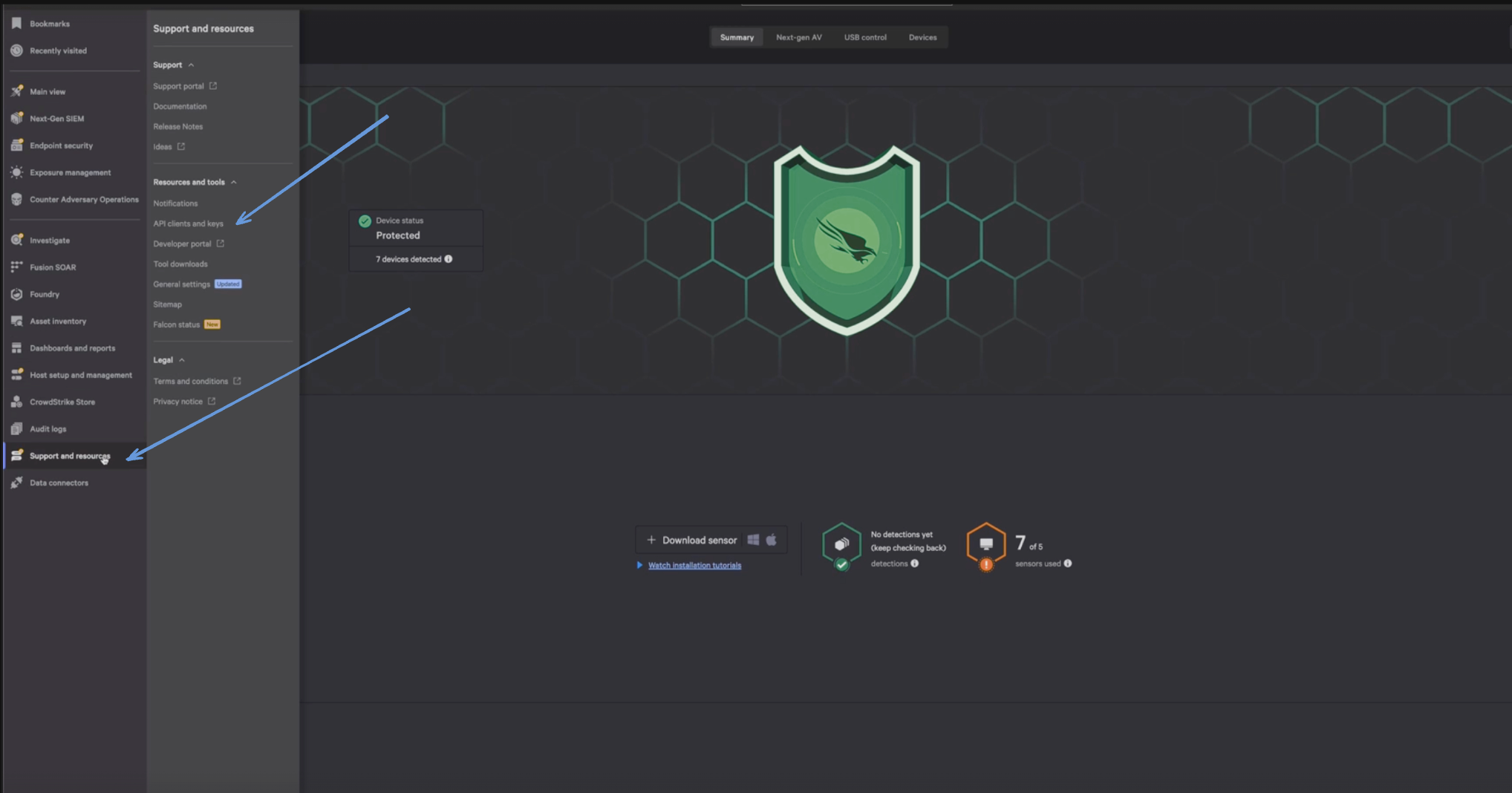
Before you connect Monad to CrowdStrike, you need a Client ID and Client Secret. Log in to your CrowdStrike portal, and under Support & Resources, click on 'API Client and Keys' to create your credentials.
Enter a Client Name, Description and API Scopes to define the API client. Ensure read roles for Hosts are enabled.
Click Done.
Copy the ClientID and ClientSecret key. You'll need them when you set up the Monad connector.
Details
Monad uses the cron field to run on specific intervals and returns all device details, performing a full sync of data each time.
Configuration
The following configuration defines the input parameters. Each field's specifications, such as type, requirements, and descriptions, are detailed below.
Settings
Setting
Type
Required
Description
Cron
string
Yes
Cron string for scheduling tasks. Ex: '0 0 * * *' for daily execution at midnight.
Cloud Type
string
No
Your cloud type for CrowdStrike. Ex: 'autodiscover', 'us-1', 'us-2', 'eu-1', 'us-gov-1'.
Secrets
Secret
Type
Required
Description
Client ID
string
Yes
Client ID for the CrowdStrike API. This is required to authenticate requests.
Client Secret
string
Yes
Client Secret for the CrowdStrike API. This is required to authenticate requests.
OCSF Conversion
The following JQ transformation converts Crowdstrike Device Details data to OCSF Version 1.1.0 compliant format.

The JQ transformation converts Crowdstrike Device Details to OCSF Version 1.1.0 with the following key mappings:
Device Information
Type ID: Maps directly from product_type_desc
Hostname: Maps from hostname
Name: Maps from hostname
UID: Maps from device_id
IP: Maps from an array of [local_ip, connection_ip, external_ip]
MAC: Maps from an array of [mac_address, connection_mac_address]
Is Managed: Derived from provision_status
Serial Number: Maps from serial_number
Domain: Maps from machine_domain
Product:
Name: Maps from system_product_name
Type: Maps from product_type
Type_id: Maps from product_type_desc
Vendor_name: Maps from system_manufacturer
Tags: Maps from tags
Group:
Name: Maps from groups
UID: Maps from group_hash
Host Information
OS:
Name: Maps from os_product_name
Version: Maps from os_version
Build: Maps from os_build
Kernel_version: Maps from kernel_version
Type: Derived from os_product_name (windows/linux/unknown)
Users: Array containing user information:
Name: Maps from last_login_user
UID: Maps from last_login_uid
Domain_uid: Maps from last_login_user_sid
Email_addr: Maps from email
HW:
CPU: Vendor and signature mapped from cpu_vendor and cpu_signature
BIOS: Vendor and version mapped from bios_manufacturer and bios_version
Chassis: Type and description mapped from chassis_type and chassis_type_desc
Cloud Information
Provider: Maps from service_provider
Account: UID maps from service_provider_account_id
Instance: UID maps from instance_id
Cloud Information
Provider: Maps from service_provider
Account: UID maps from service_provider_account_id
Instance: UID maps from instance_id
Operating System Information
Name: Concatenated from platform_name and os_version
Type ID: Mapped from platform_name:
Mac → 300
Windows → 100
Linux → 200
Others → 0
Version: Maps from os_version
Build: Maps from os_build
CPE Name: Generated for Mac systems
Container Information
Pod:
Name: Maps from pod_name
UID: Maps from pod_id
Namespace: Maps from pod_namespace
IP: Maps from an array of [pod_ip4, pod_ip6]
Host:
Hostname: Maps from pod_hostname
IP: Maps from an array of [pod_host_ip4, pod_host_ip6]
Labels: Maps from pod_labels
Annotations: Maps from pod_annotations
Service Account Name: Maps from pod_service_account_name
K8s:
Cluster:
UID: Maps from k8s_cluster_id
Version: Maps from k8s_cluster_version
Git_version: Maps from k8s_cluster_git_version
State Information
Status: Maps from status
First_seen_time: Maps from first_seen
Last_seen_time: Maps from last_seen
Last_reboot_time: Maps from last_reboot
First_login_time: Maps from first_login_timestamp
Last_login_time: Maps from last_login_timestamp
Modified_time: Maps from modified_timestamp
Agent Information
Version: Maps from agent_version
Local_time: Maps from agent_local_time
Load_flags: Maps from agent_load_flags
Config:
Base: Maps from config_id_base
Build: Maps from config_id_build
Platform: Maps from config_id_platform
Network Information
Default_gateway: IP maps from default_gateway_ip
Policy Information
Names: Maps policy names from policies array
Additional Information
Meta: Maps from meta
Org:
Timezone_offset: Maps from host_utc_offset
OU: Maps from ou
Site_name: Maps from site_name
Zone_group: Maps from zone_group
Flags:
Various flags mapped directly from corresponding fields
Metadata
Version: Set to "1.1.0"
Product:
Name: Maps from platform_name
Version: Maps from agent_version
Feature:
Name: "Host Information"
Unmapped Fields
Additional fields not part of the OCSF schema are preserved in the unmapped object for reference and potential future use.
Customization
The transformation serves as a starting point and can be modified to accommodate specific requirements while maintaining OCSF compliance. The mapping prioritizes essential device information and platform detection while providing appropriate handling for optional fields.