PagerDuty
Sends events to PagerDuty for incident management and operational awareness.
Note
This output is NOT meant to be used as a traditional Monad output to ingest logs at scale. PagerDuty is an incident management platform, which with Monad is best utilized by using Monad's conditional data routing capabilities, which have been explained further below.
Details
PagerDuty allows events sent to it to be of 2 types: Change Events or Alert Events. Monad's PagerDuty connector allows you to choose between these events. In a scenario where you choose to send alert events, ALL events sent to this output would trigger incidents, and the consequent responses (person on-call receiving notifications, a phone call, etc.). In the case of change events, these events are logged in PagerDuty and are visible on the dashboard. To read more on alert vs change events, visit https://developer.pagerduty.com/docs/events-api-v2-overview.
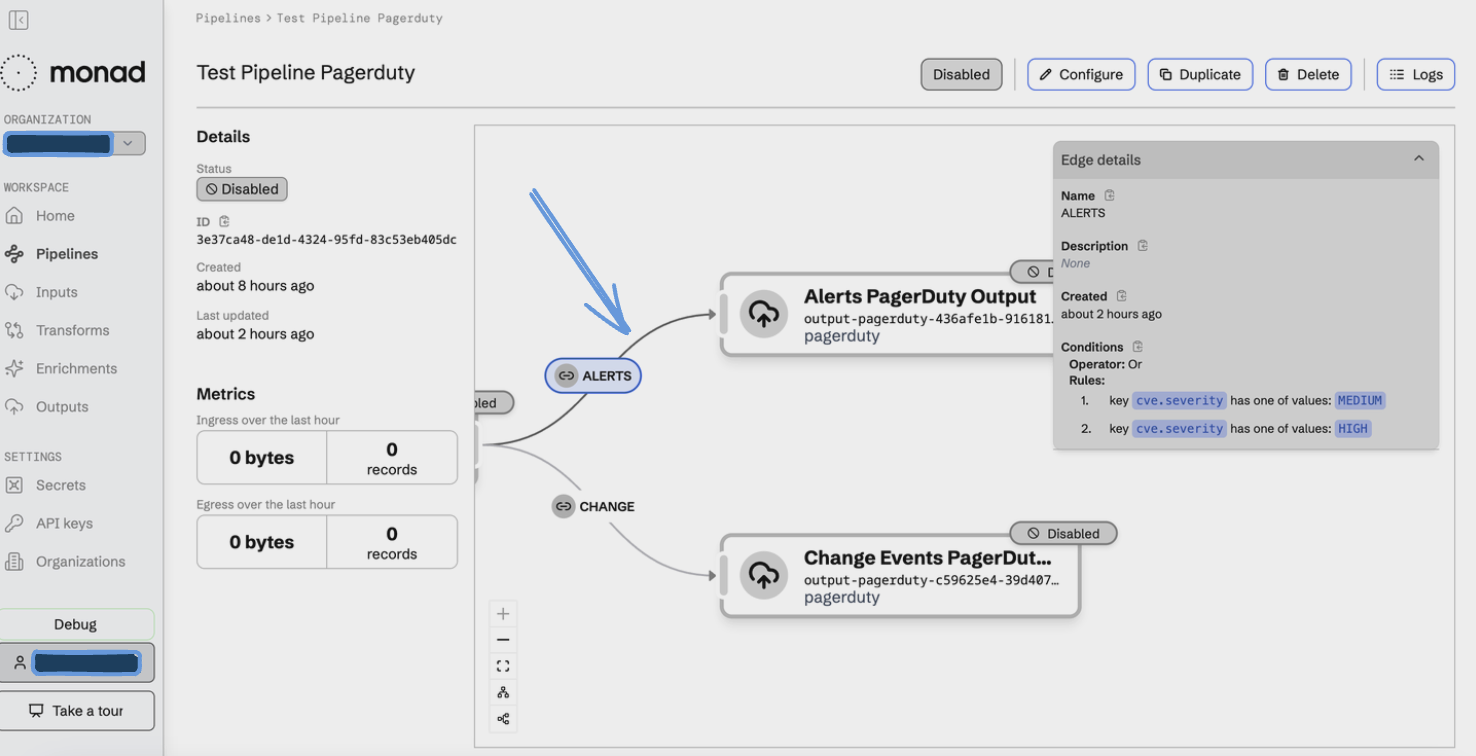
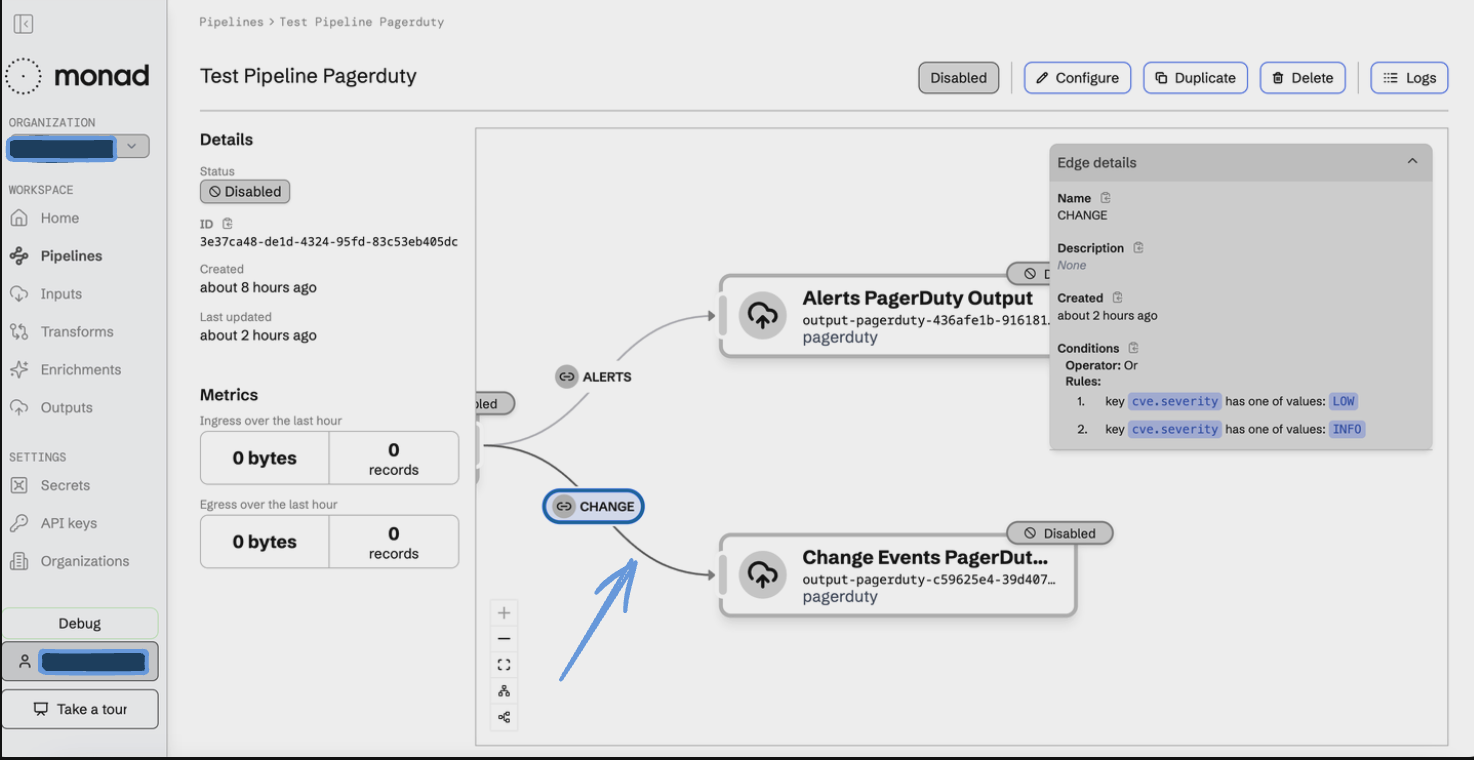
Since Monad allows sending of only a binary choice between alert/change events, the below is a simple example of how conditional routing in Monad to be used to make best use of this connector.
- Creation of an Input connector in Monad that emits some form of vulnerability logs.
- Creation of 2 instances of the PagerDuty connector, one sending alert events and the other sending change events to PagerDuty.
- Reviewing the schema of data emitted from the input source to look for keys and values that should trigger PagerDuty's on-call capabilities. For example:
{
    "severity": "high | low | medium | info"
}
- Adding conditional routing in Monad to send data to the appropriate PagerDuty output out of the 2 we created.
Below images show an example of a pipeline in Monad with conditional data routing where events based on conditions are sent to a specific instance of PagerDuty, one configured to receive alerts and the other for generic change events.
Setup
Step 1: Create a PagerDuty account from: https://www.pagerduty.com/
From the above step, you would be eligible to create an API key and receive your Routing key.
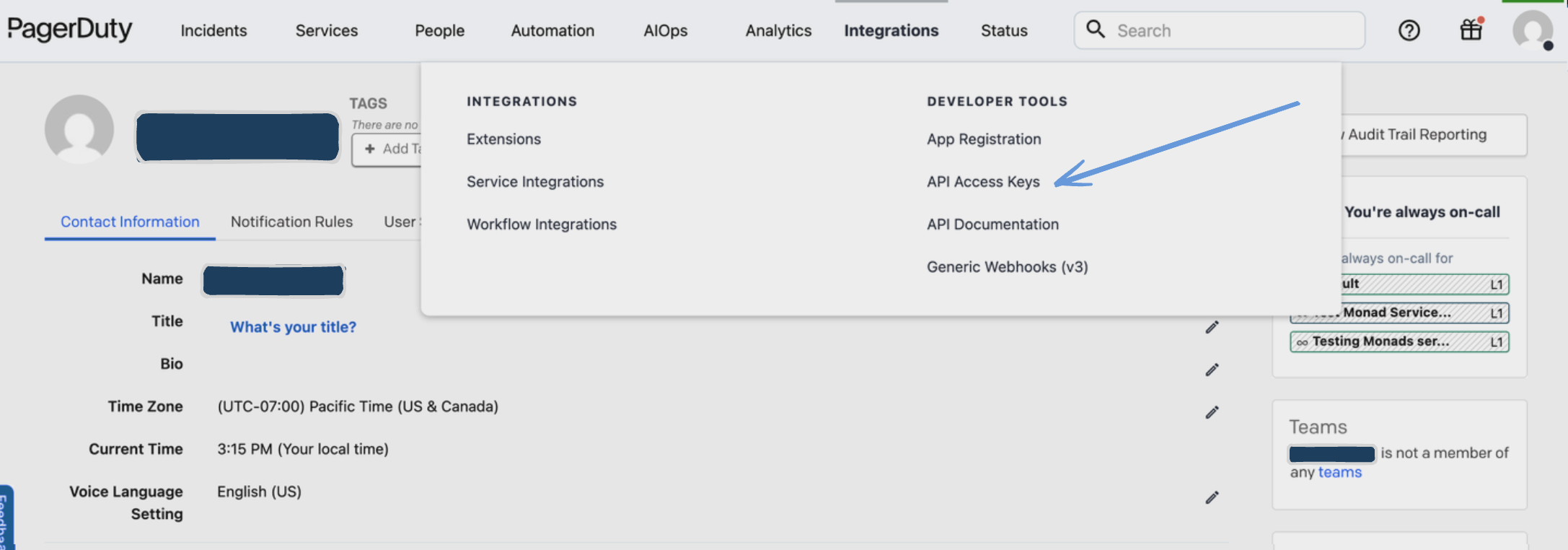
Step 2: Fetch your API key
- In the web app, navigate to Integrations API Access Keys under Developer Tools to create one.
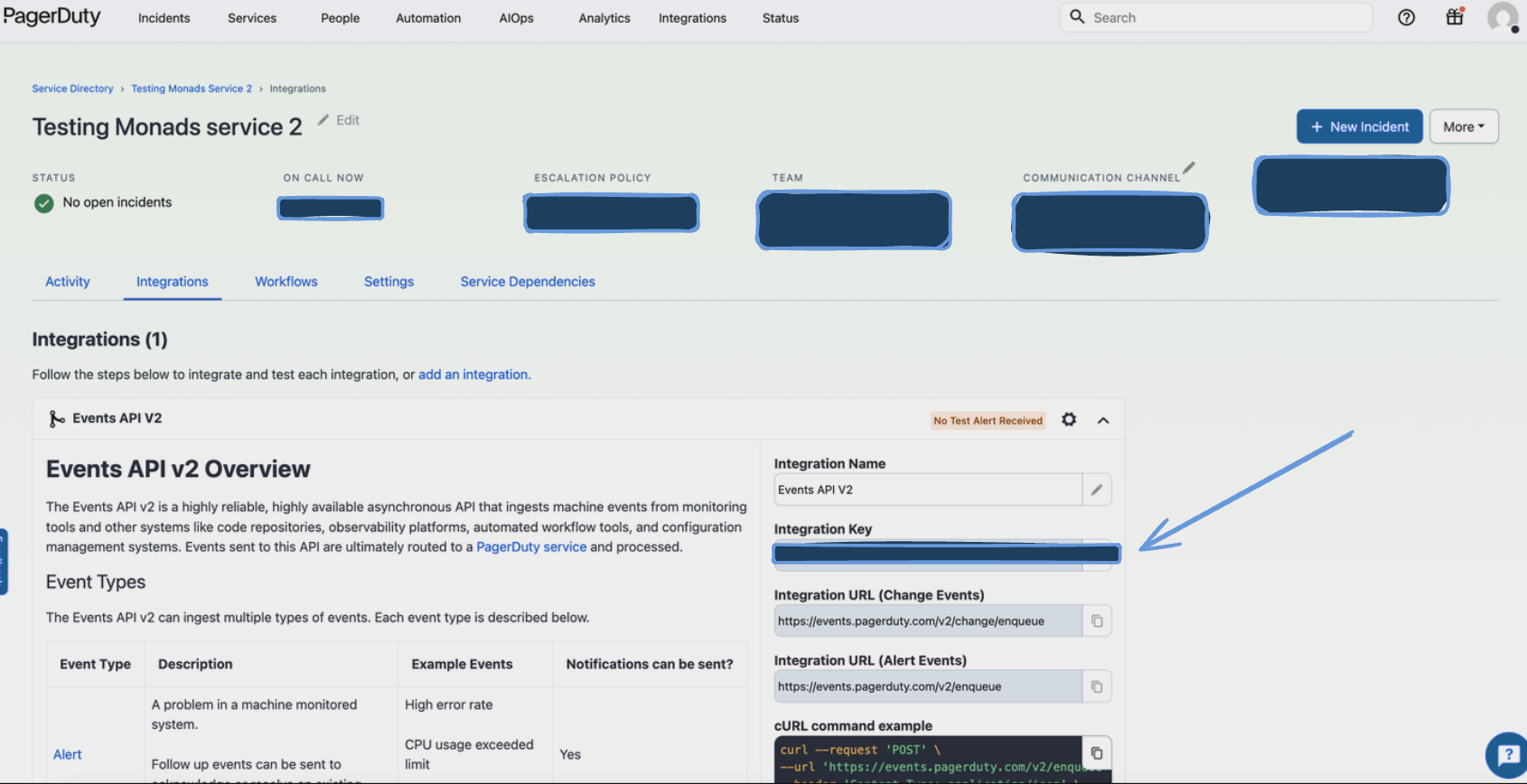
Step 3: Fetch your routing/integration key
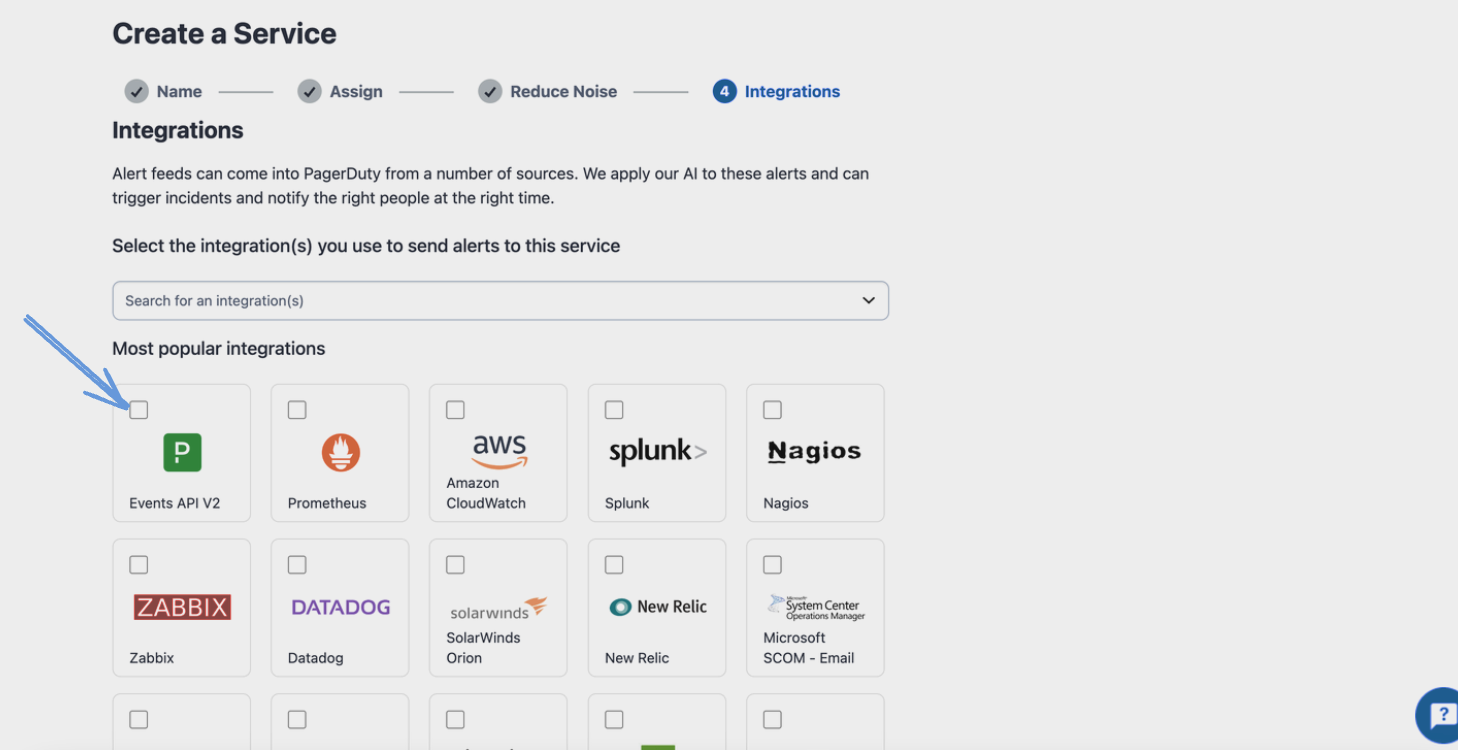
This step requires the creation of a New Service in PagerDuty, where you would be able to view incidents, and change events. You can create a New Service from the Service Directory on the web app. You can configure settings/escalation policies based on your team's requirements.

Use the Events API V2 as the integration to get your routing key.
Save the Integration Key to be used on the Monad platform for the output connector.
Configuration
The following configuration defines the output's parameters. Each field's specifications, such as type, requirements, and descriptions, are detailed below.
Settings
| Setting | Type | Required | Description |
|---|---|---|---|
| Event Type | string | Yes | Events can either be 'change' events or 'alert' events. Defaults to 'change'. Options: 'change', 'alert' |
| Alerts Config | object | No | Configuration if your Event type is set to alerts |
| └── Severity | string | No | Indicates the severity of the impact to the affected system. Applicable if event type is set to alerts. Defaults to 'critical'. Options: 'info', 'warning', 'error', 'critical' |
| └── Group | string | No | A cluster or grouping of sources. For example, sources "prod-datapipe-02" and "prod-datapipe-03" might both be part of "prod-datapipe". Applicable if event type is set to alerts. Defaults to empty value. |
| └── Class | string | No | Class defines the class/type of the event based on the input source. Defaults to empty value. |
| Summary Config | string | No | Summary for what you'd want event summaries to look like in the PagerDuty dashboard |
| └── Alert Summary | string | No | Alert Summary is the custom summary message for alert events. Defaults to 'Monad triggered alert event'. |
| └── Change Summary | string | No | Change Summary is the custom summary message for change events. Defaults to 'Monad triggered change event'. |
| └── Alert Event Source | string | No | Alert Event Source is the source identifier for alert events. Defaults to 'monad-platform'. |
| └── Change Event Source | object | No | Change Event Source is the source identifier for change events. Defaults to 'monad-platform'. |
Secrets
| Secret | Type | Required | Description |
|---|---|---|---|
| Routing Key | string | Yes | This is the 32 character Integration Key for an integration on a service or on a global ruleset. |
| Auth Token | string | Yes | Authentication token required to authenticate with the PagerDuty API |