Crowdstrike Next-Gen SIEM
Forwards processed data to Crowdstrike’s Next-Gen SIEM.
Requirements
- An active Crowdstrike Falcon subscription with Next-Gen SIEM access
- A valid Crowdstrike Falcon API token with appropriate permissions
- The Crowdstrike Falcon Next-Gen SIEM endpoint URL
- Network access to the Crowdstrike Falcon Next-Gen Siem's API endpoints
Setting up
To configure the CrowdStrike Next-Gen SIEM destination, you'll need to set up a Monad connector in your CrowdStrike environment. Follow these steps:
-
Access CrowdStrike Console
- Log into your CrowdStrike console
- Navigate to the main menu
- Select "Next-Gen SIEM" followed by "Data onboarding"
-
Create Data Connector
-
Locate the "Monad" connector in the Data Source page
-
Click "Configure" to begin the connector setup process
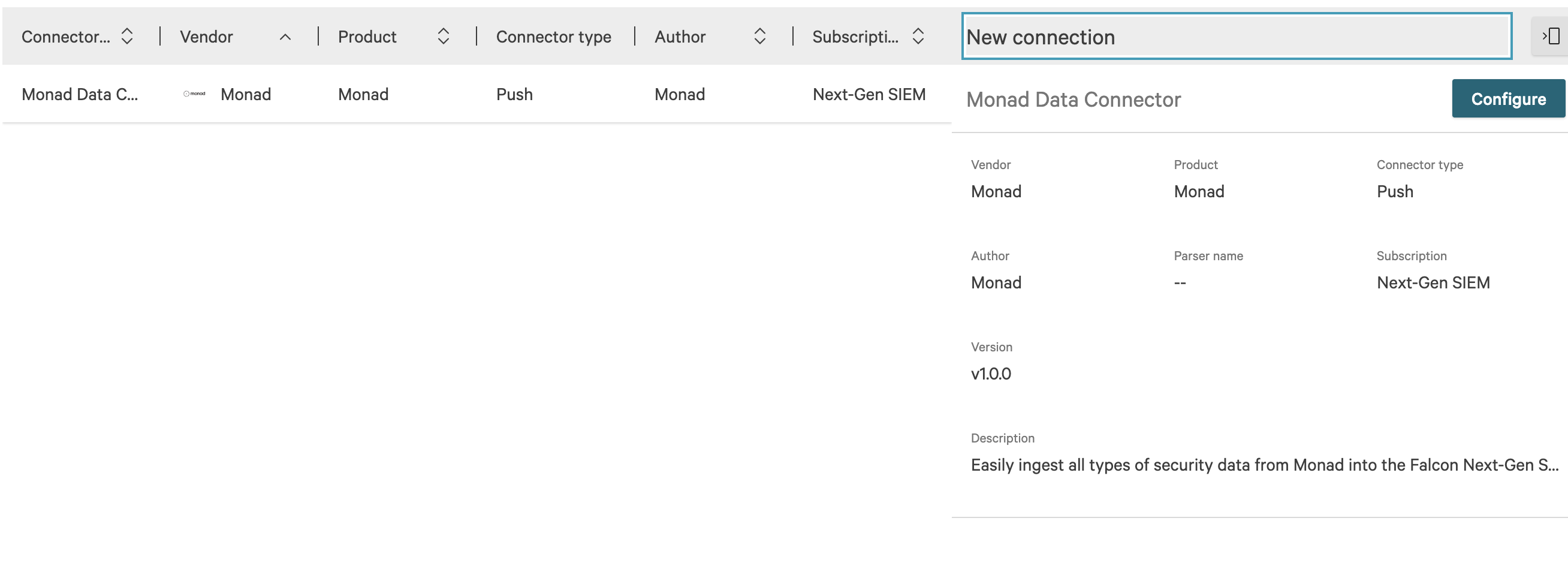
The Monad connector shown in the CrowdStrike Data Sources page
-
-
Configure Connector Details
- Fill in the following required fields:
- Data Source: Select your specific data source type
- Data Type: Select "JSON" (recommended for best compatibility)
- Connector name: Provide a descriptive name
- Description: (Optional) Add details about the connector's purpose
- Under Parser details, either:
- Select an existing parser, or
- Create a new parser as needed
- Review and accept the Terms and Conditions
- Click Save to proceed
- Fill in the following required fields:
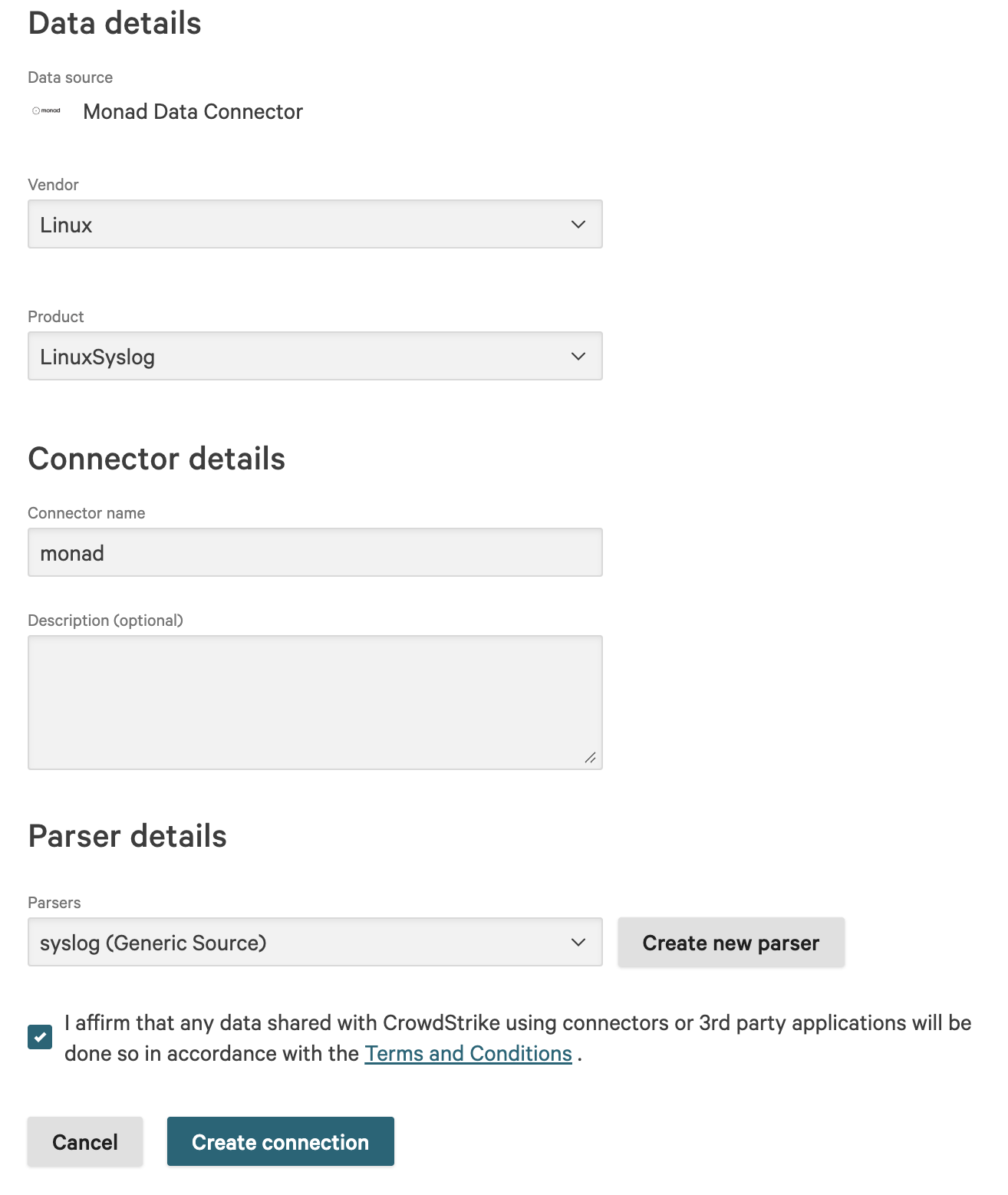
Configuration page for the Monad connector in CrowdStrike
- Generate Authentication Credentials
- Wait for the connector initialization to complete
- Look for the "Generate API key" option in the banner
- Click to generate your credentials
- Copy and securely store both:
- The generated API key
- The API URL
These credentials will be used in the next section when configuring your Output.
Functionality
The output processes and forwards data to Crowdstrike Falcon's Next-Gen SIEM platform using the following workflow:
- Receives processed events from the pipeline
- Groups events into batches for efficient transmission
- Securely authenticates with Crowdstrike using the provided API token
- Sends data to the specified Crowdstrike endpoint using HTTPS
Best Practices
-
Security:
- Rotate API tokens regularly
-
Parser Configuration:
- Ensure your Crowdstrike parser matches your data format
- Test parser with sample data before production use
- Monitor parser performance and error rates
- Update parser configuration as data format changes
-
Data Quality:
- Validate event format matches parser expectations
- Include all required fields in your events
- Follow Crowdstrike's recommended field naming conventions
- Implement proper error handling for malformed data
-
Error Handling:
- Implements exponential backoff for failed requests
- Retries failed transmissions up to 3 times
- Logs detailed error messages for troubleshooting
- Maintains failed event queue for retry processing
Limitations
- Maximum batch size: 100 events per request
- Maximum batch size: 16MB per batch
- API rate limits apply based on your Crowdstrike subscription
- Events older than 7 days may be rejected by the platform
- Only supports HTTPS protocol for data transmission
Troubleshooting
-
Authentication Failures:
- Verify API token is valid and not expired
- Check token permissions in Crowdstrike console
- Ensure correct endpoint URL is configured
-
Connection Timeouts:
- Verify network connectivity to Crowdstrike endpoints
- Check for any firewall restrictions
- Validate proxy settings if applicable
-
Data Rejection:
- Verify event format matches specified parser
- Check event size doesn't exceed limits
- Ensure required fields are present in events
Configuration
The Crowdstrike Falcon Next-gen Siem Output is configured using the following settings:
Settings
| Setting | Type | Required | Description |
|---|---|---|---|
| Endpoint | string | Yes | CrowdStrike Monad connector ingestion URL. This URL is generated within the CrowdStrike platform and follows the format: https://<connection-id>.ingest.<your-region>.crowdstrike.com/services/collector |
Secrets
| Setting | Type | Required | Description |
|---|---|---|---|
| Auth Token | string | Yes | CrowdStrike Monad connector API token. |