

GitLab Issues
Collects and ingests issues from a GitLab project using the GitLab Issues API.
Details
The GitLab Issues input allows you to collect and ingest issue data from a GitLab project using the GitLab Issues API. This input supports extensive filtering options, state-based tracking, and scheduled execution to automatically monitor issues across your GitLab instance.
Key Features
- Comprehensive Filtering: Filter issues by state, labels, assignees, authors, milestones, and more
- State Tracking: Maintains state to incrementally collect new issues based on last updated timestamps
- Flexible Scheduling: Run on custom cron schedules to match your monitoring needs
- Multi-Project Support: Can collect from specific projects or all accessible projects
- Rich Metadata: Collects complete issue data including comments count, time stats, and task completion
- GitLab.com and Self-Hosted: Works with both GitLab.com and self-hosted GitLab instances
Data Collection Strategy
The input uses state tracking to efficiently collect issues:
- On first run, collects all issues matching your filter criteria
- On subsequent runs, collects only issues updated after the last successful run
- Sorts issues by date they are updated in ascending order to ensure proper state tracking
- Updates the state timestamp with the latest issue's update time
Prerequisites
Before setting up the GitLab Issues input, you need:
- GitLab Access: Access to a GitLab instance (GitLab.com or self-hosted)
- Personal Access Token: A GitLab Personal Access Token with appropriate permissions
- API Permissions: The token must have
read_apiscope to access issues
Creating a Personal Access Token
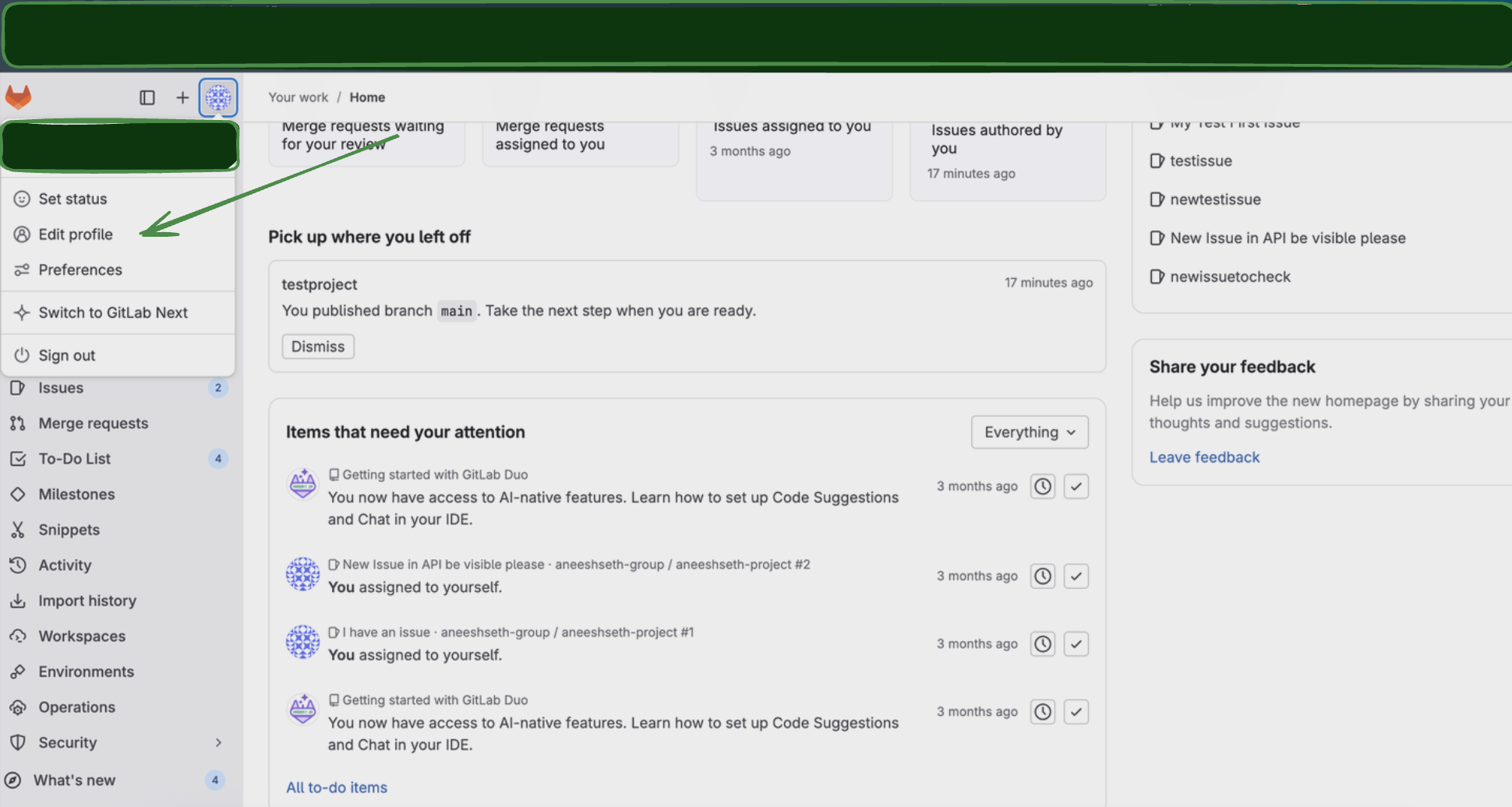
- Log in to your GitLab instance
- Go to Edit Profile > Access Tokens
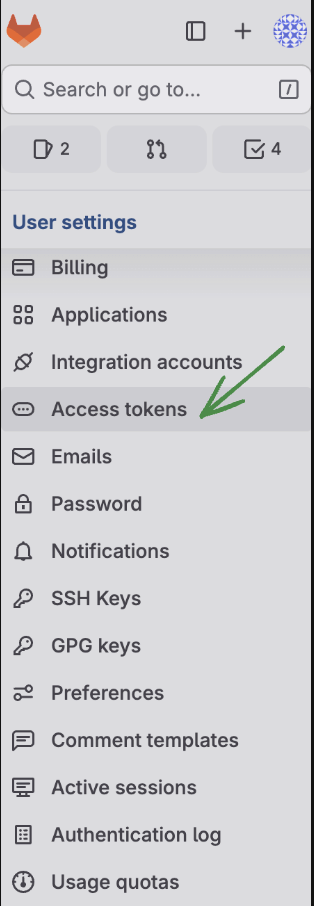
- Click Add new token
- Configure the token:
- Name: Enter a descriptive name (e.g., "Monad Issues Connector")
- Expiration date: Set an appropriate expiration date
- Scopes: Select
read_apiscope.
- Click Create personal access token
- Important: Copy the token value immediately as it won't be shown again
Configuration
Settings
| Setting | Type | Required | Default | Description |
|---|---|---|---|---|
| Project ID | string | Yes | - | Project ID to get issues for |
| GitLab URL | string | Yes | https://gitlab.com | GitLab URL for Custom-Urls when self hosting. Defaults to https://gitlab.com. |
| State | string | No | all | Filter issues by state. Options: opened, closed, all |
| With Label Details | boolean | No | false | If true, the response returns more details for each label in labels field: |
| Confidential | boolean | No | false | If true, only show confidential issues |
| Issue Type | string | No | - | Filter by issue type. Options: issue, incident, test_case, task |
| Backfill Start Time | string | No | The date to start fetching data from. If not specified, no past records will be fetched. |
Secrets
| Secret | Type | Required | Description |
|---|---|---|---|
| Personal Access Token | string | Yes | GitLab Personal Access Token with read_api scope |
API Reference
This input uses the GitLab Issues API endpoints:
- Primary Endpoint:
GET /projects/<project_id>/issues- Lists all issues the authenticated user has access to from the project id given. - Rate Limiting: Respects GitLab's API rate limits.
- Authentication: Uses Bearer token authentication with Personal Access Tokens.
Troubleshooting
Common Issues
-
No Issues Returned
- Check that
scopeis set toallif you want to see all accessible issues - Verify your Personal Access Token has the correct permissions
- Ensure you have access to the GitLab instance and projects
- Check that
-
Authentication Errors
- Verify your Personal Access Token is valid and not expired
- Check that the token has
read_apiscope. - Ensure the token belongs to a user with access to the desired project.
Related Articles
- GitLab Issues API Documentation
- GitLab Personal Access Tokens
- GitLab Issue Management
- GitLab API Rate Limits
Sample Record
Code
Sync frequency
By default this input polls approximately every 10 seconds, with each sync beginning after the previous one completes. A cron schedule configured on the pipeline overrides this cadence. See Input Sync Frequency for details.