# Google Cloud SQL Server
This output supports efficient batch loading of data into Google Cloud managed SQL Server tables.
## Prerequisites
The Google Cloud SQL Server Output requires:
- An existing SQL Server database
- A database user with permissions to write to tables
- The target table must exist with appropriate schema
## Setting up the Service Account
Required for Monad Authenticating your account with Google Cloud.
1. Go to the [Google Cloud Console](https://console.cloud.google.com/).
2. Select your project from the project dropdown at the top of the page.
3. Navigate to "IAM & Admin" > "Service Accounts".
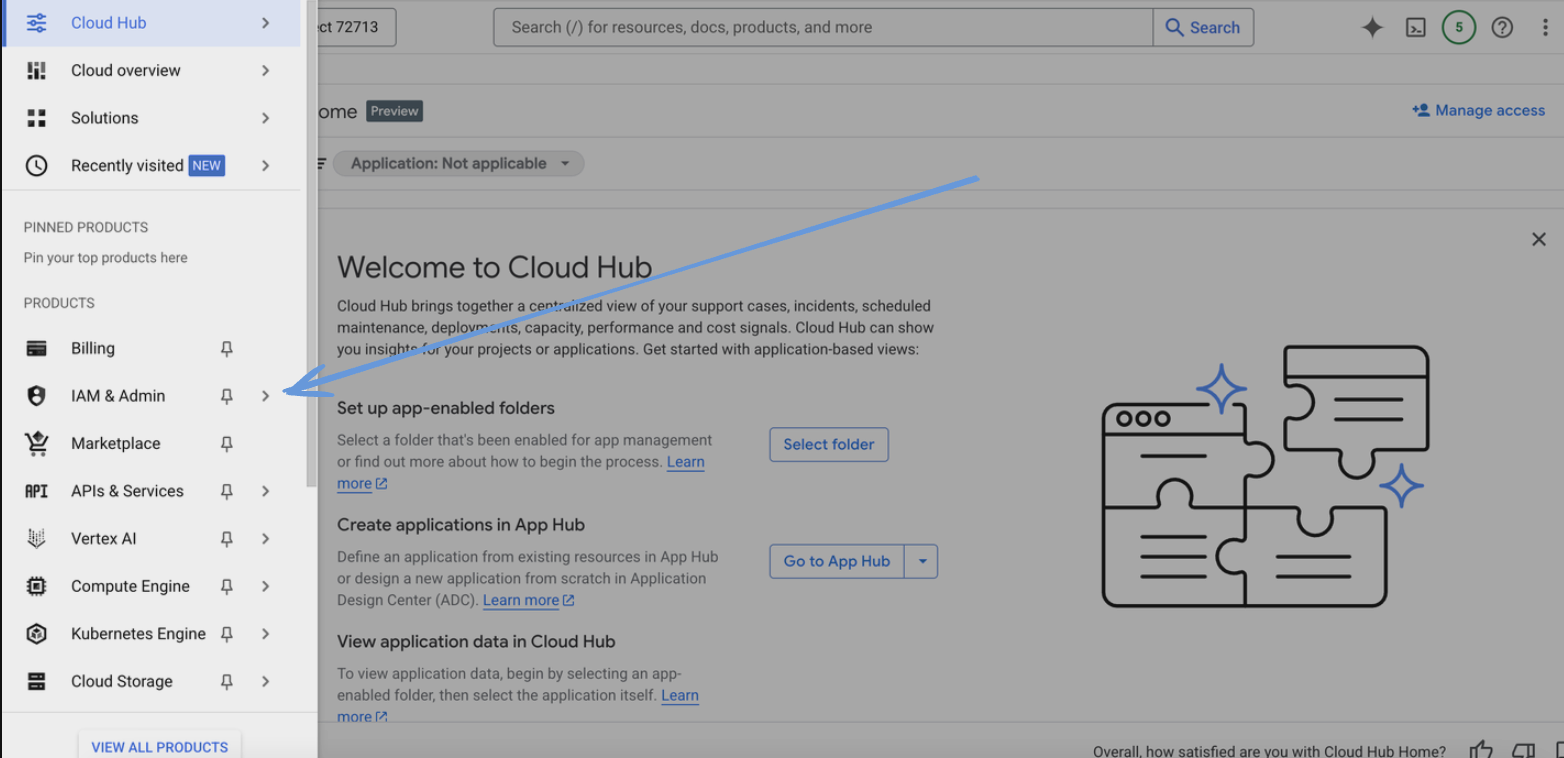 4. Click "Create Service Account".
5. Enter a name for the service account and click "Create".
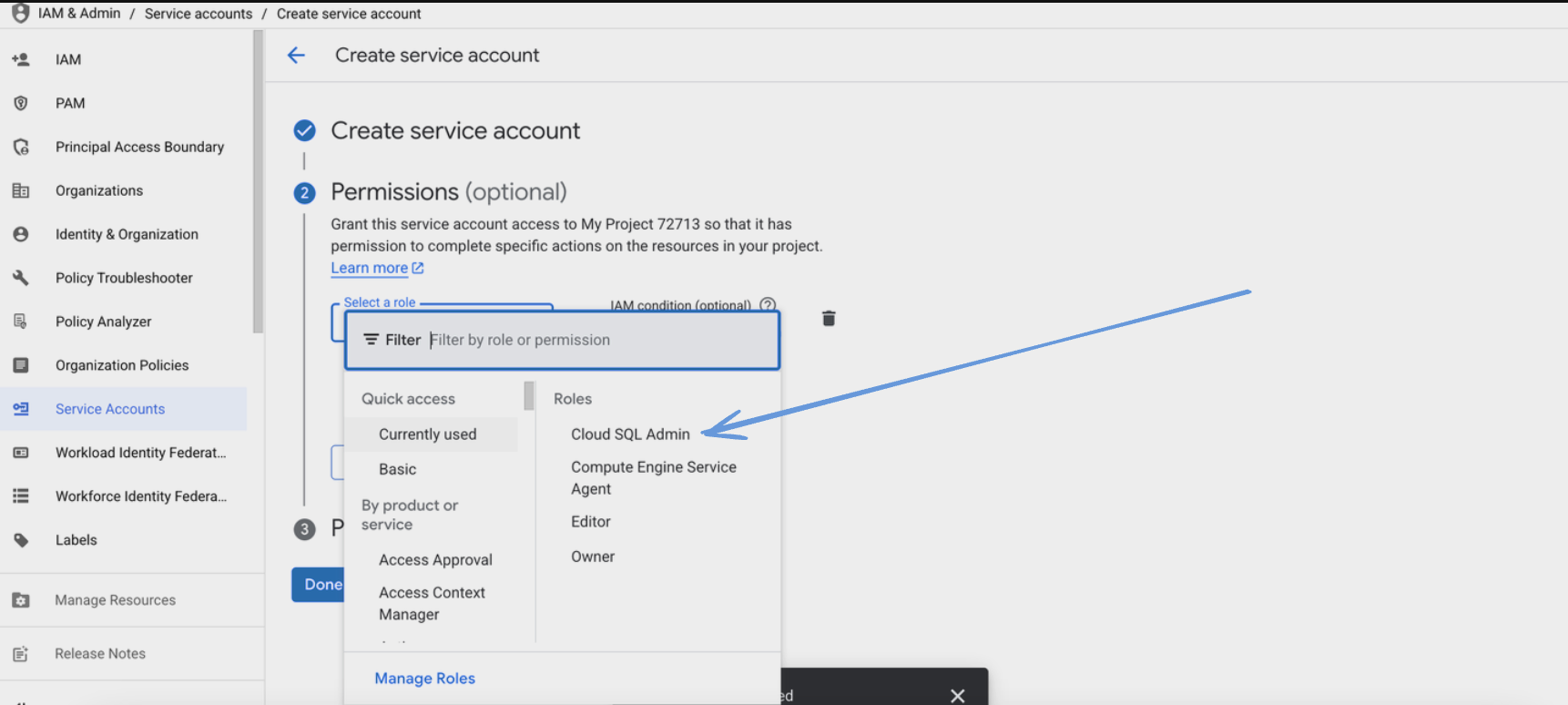
6. Assign the following role to the service account:
- Cloud SQL Client role
4. Click "Create Service Account".
5. Enter a name for the service account and click "Create".
6. Assign the following role to the service account:
- Cloud SQL Client role
 7. Click "Continue" and then "Done".
8. Find the newly created service account in the list and click on it.
9. Go to the "Keys" tab and click "Add Key" > "Create new key".
7. Click "Continue" and then "Done".
8. Find the newly created service account in the list and click on it.
9. Go to the "Keys" tab and click "Add Key" > "Create new key".
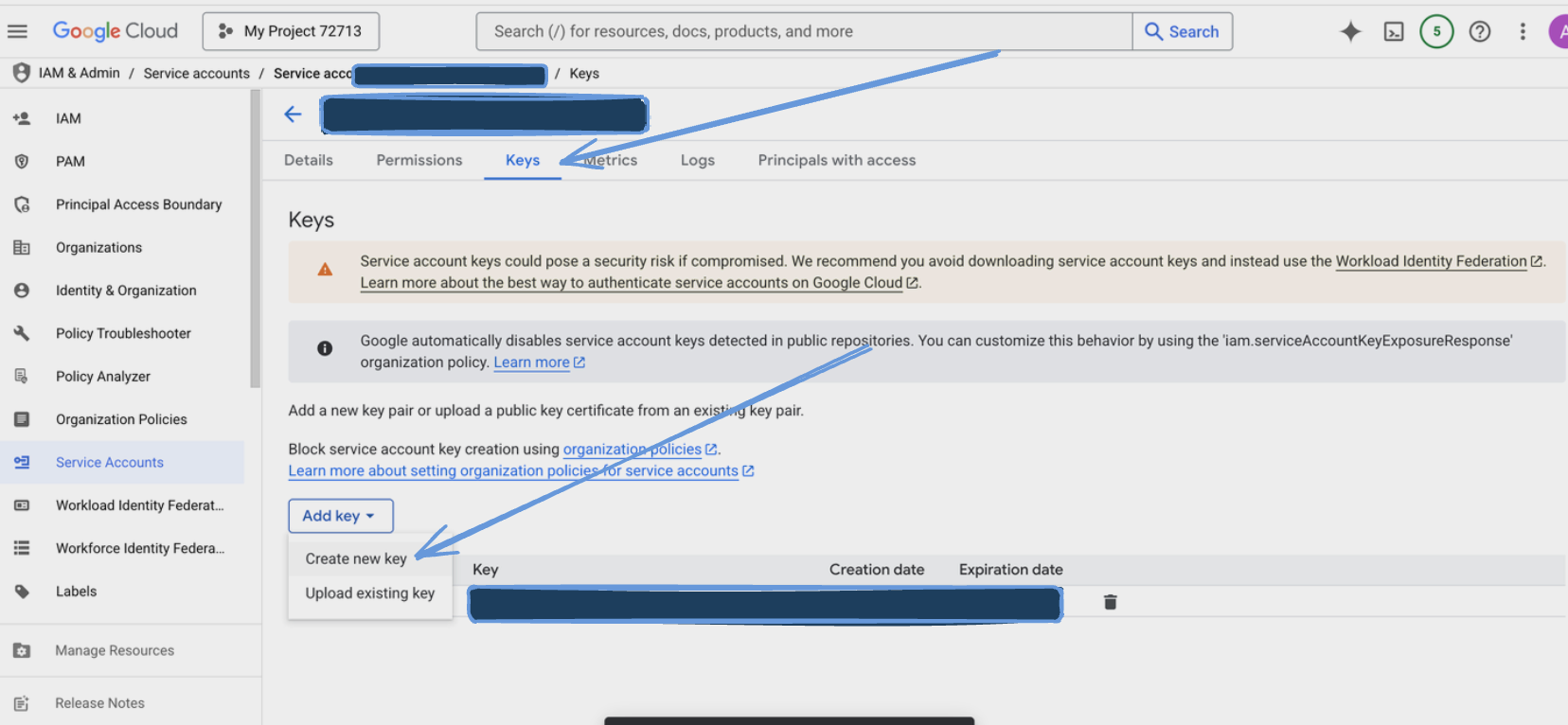 10. Choose JSON as the key type and click "Create".
11. Save the downloaded JSON key file securely.
## Configuration
The Google Cloud SQL Server Output can be configured using individual connection parameters found on the Google Cloud Console.
### Settings
| Setting | Type | Required | Default | Description |
|---------|------|----------|---------|-------------|
| User | string | Yes | - | The user to connect to the SQL Server database |
| Database | string | Yes | - | The database name to connect to |
| Table | string | Yes | - | The table name to write data to |
| Column Names | array[string] | No | - | The column names to write data to, must match the root fields of the data. If not provided all root fields will be used |
| Instance Connection Name | string | Yes | - | Used to identify and connect to your Cloud SQL instance |
### Secrets
| Setting | Type | Required | Description |
|---------|------|----------|-------------|
| Password | text | Yes | The password for the SQL Server user |
| Credentials JSON | string | Yes | String for the service account JSON key file |
## Data Loading
The Google Cloud SQL Server Output uses efficient batch loading with the following characteristics:
1. **Batch Processing**
- Records are automatically batched for efficient loading
- Default batch size: 100 records
- Maximum batch data size: 1 MiB
- Batch processing interval: 5 seconds
2. **Column Handling**
- Automatically maps JSON fields to table columns
- Supports explicit column mapping via column_names setting
- Handles missing fields by inserting NULL values
- Uses the first record's schema if no column names are specified
## Best Practices
### Data Types
- Ensure column types match your data
- Consider using JSONB for complex nested structures
- Use appropriate numeric types for precision requirements
10. Choose JSON as the key type and click "Create".
11. Save the downloaded JSON key file securely.
## Configuration
The Google Cloud SQL Server Output can be configured using individual connection parameters found on the Google Cloud Console.
### Settings
| Setting | Type | Required | Default | Description |
|---------|------|----------|---------|-------------|
| User | string | Yes | - | The user to connect to the SQL Server database |
| Database | string | Yes | - | The database name to connect to |
| Table | string | Yes | - | The table name to write data to |
| Column Names | array[string] | No | - | The column names to write data to, must match the root fields of the data. If not provided all root fields will be used |
| Instance Connection Name | string | Yes | - | Used to identify and connect to your Cloud SQL instance |
### Secrets
| Setting | Type | Required | Description |
|---------|------|----------|-------------|
| Password | text | Yes | The password for the SQL Server user |
| Credentials JSON | string | Yes | String for the service account JSON key file |
## Data Loading
The Google Cloud SQL Server Output uses efficient batch loading with the following characteristics:
1. **Batch Processing**
- Records are automatically batched for efficient loading
- Default batch size: 100 records
- Maximum batch data size: 1 MiB
- Batch processing interval: 5 seconds
2. **Column Handling**
- Automatically maps JSON fields to table columns
- Supports explicit column mapping via column_names setting
- Handles missing fields by inserting NULL values
- Uses the first record's schema if no column names are specified
## Best Practices
### Data Types
- Ensure column types match your data
- Consider using JSONB for complex nested structures
- Use appropriate numeric types for precision requirements