# User Groups
Lists all user groups within a Slack workspace for role-based context.
**Sync Type: Full Synchronisation**
## Requirements
- Before you connect Monad to Slack, you need an API token.
- Your API token needs to scoped to `users:read` to run this input connector.
- To obtain an API Token, you need to have a slack app.
**To create a Slack app:**
- On the Your [Apps page](https://api.slack.com/apps), select Create New App.
- Select From scratch.
- Enter your appropriate App Name.
- Select the Workspace where you'll be developing your app. You'll be able to distribute your app to other workspaces later if you choose.
- Select Create App.
After creating your slack app, you now need a token with appropriate scopes.
**Configuring Permissions within your app**:
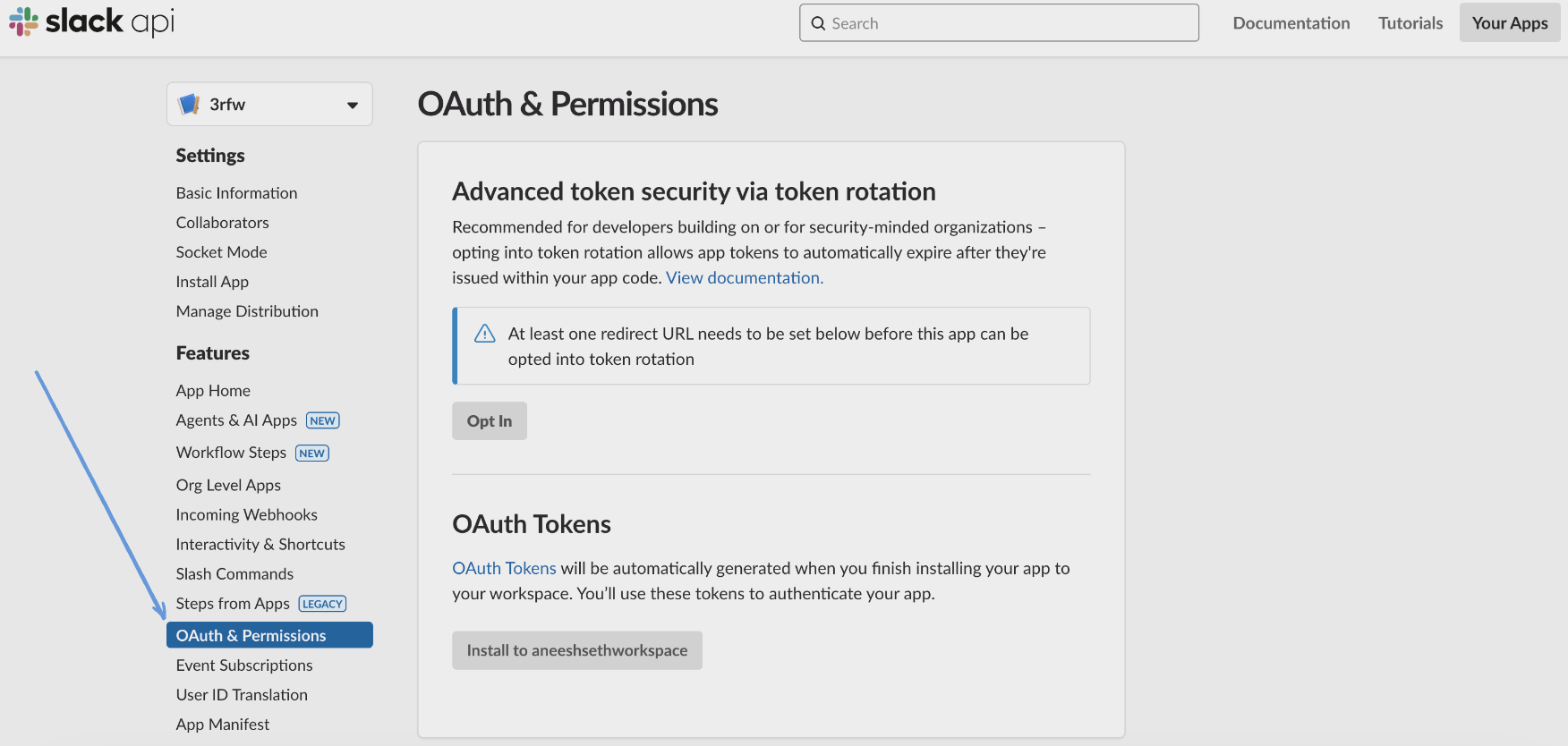
- Within OAuth & Permissions, scroll down to Scopes.
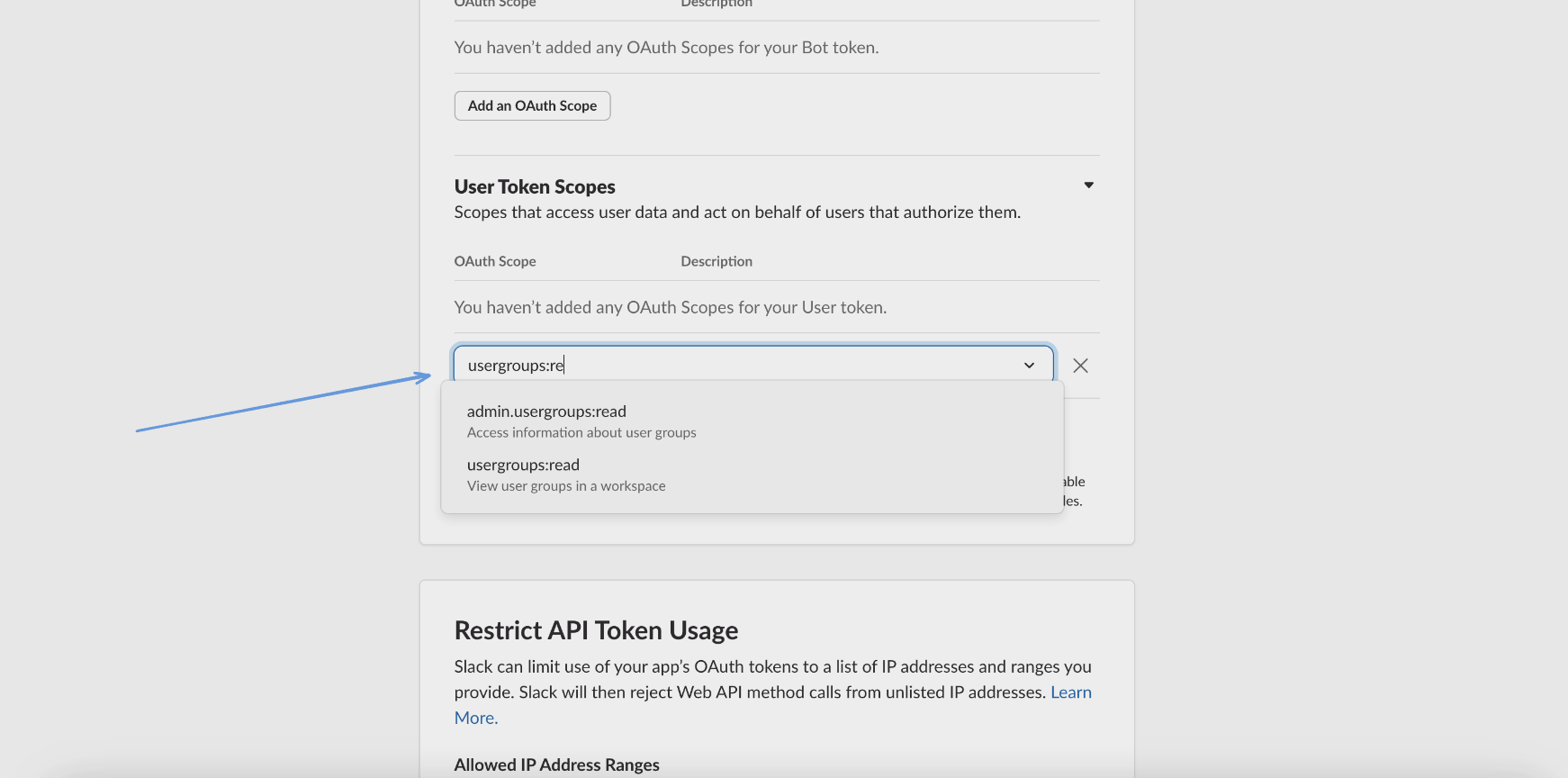
 - Under Bot/User Token Scopes, select Add an OAuth Scope.
- To allow connection of Monad to Slack for this input connector, add the `usergroups:read` scope.
- Under Bot/User Token Scopes, select Add an OAuth Scope.
- To allow connection of Monad to Slack for this input connector, add the `usergroups:read` scope.
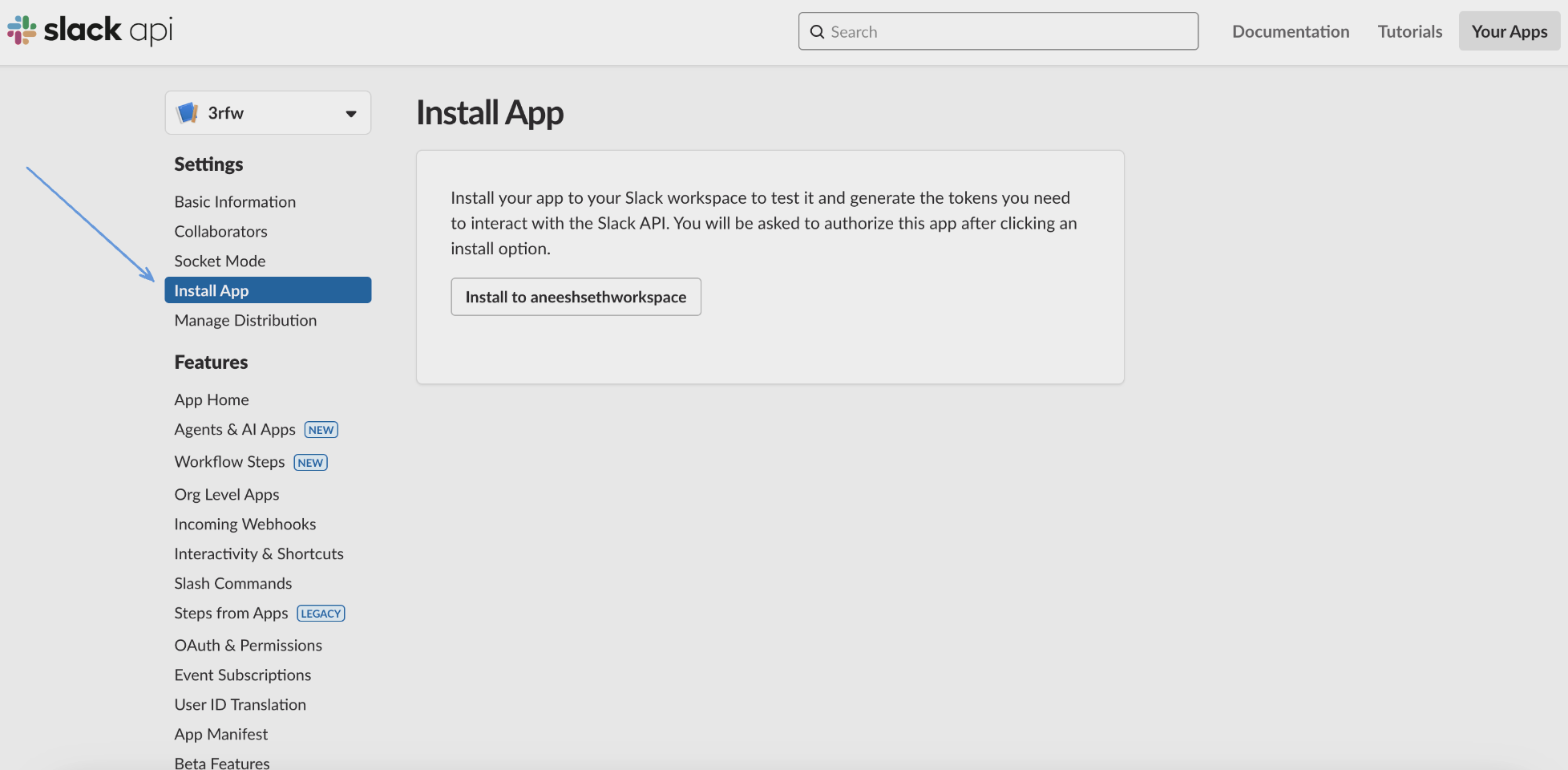
 - Once that's done, install the slack app to your workspace from the section in the image below, after which you will receieve your slack token to connect to Monad.
 ## Details
Monad uses the `cron` field to schedule the input at specific intervals, returning all users across teams if no team ID is specified, or limiting the scope to a specific team if a team ID is provided. In both cases, a full data sync is performed each time.
## Configuration
The following configuration defines the input parameters. Each field's specifications, such as type, requirements, and descriptions, are detailed below.
#### Settings
| Setting | Type | Required | Description |
|---------|------|----------|-------------|
| Cron | string | Yes | Cron string for scheduling tasks. Ex: '0 0 * * *' for daily execution at midnight. |
| Team ID | string | No | Team ID to filter user results by. |
#### Secrets
| Secret | Type | Required | Description |
|---------|------|----------|-------------|
| Token | string | Yes | Authentication Token for the Slack API. This is required to authenticate requests. |
## Custom Schema Handling
If the source data doesn't align with any of the [OpenSecurityControlFramework (OSCF) schemas](https://schema.ocsf.io/), you can create a custom transformation using our JQ transform pipeline. For example:
```jq
{
metadata: {
schema_version: "1.0.0",
custom_framework: "my_framework"
},
controls: .[]
}
```
For more information on JQ and how to write your own JQ transformations see the JQ docs [here](https://jqlang.github.io/jq/).
If you believe this data source should be included in the standard OSCF schema set, please reach out to our team at [support@monad.com](mailto:support@monad.com). We're always looking to expand our coverage of security control frameworks based on community needs.
## Related Articles
- [https://api.slack.com/methods/usergroups.list](https://api.slack.com/methods/usergroups.list)
- [https://api.slack.com/methods](https://api.slack.com/methods)
## Sample Record
```json
{
"id": "Sd30d8802-929c-d7b4-738d-4e0aa5a47f01",
"team_id": "T18995190-f1a9-687e-02af-0bd1a5fa8505",
"is_usergroup": true,
"name": "Product Team",
"description": "eu do ad est incididunt commodo id culpa ut ut",
"handle": "product",
"is_external": false,
"date_create": 1754956013,
"date_update": 1754956013,
"date_delete": 0,
"auto_type": "admin",
"created_by": "USLACKBOT92b62f4a-7275-4724-e12f-b98d738dbe8c",
"updated_by": "Uab69acad-7f7e-f7c1-972e-5f48f0a1a4a7",
"deleted_by": null,
"prefs": {
"channels": [],
"groups": []
},
"user_count": "36"
}
```
## Details
Monad uses the `cron` field to schedule the input at specific intervals, returning all users across teams if no team ID is specified, or limiting the scope to a specific team if a team ID is provided. In both cases, a full data sync is performed each time.
## Configuration
The following configuration defines the input parameters. Each field's specifications, such as type, requirements, and descriptions, are detailed below.
#### Settings
| Setting | Type | Required | Description |
|---------|------|----------|-------------|
| Cron | string | Yes | Cron string for scheduling tasks. Ex: '0 0 * * *' for daily execution at midnight. |
| Team ID | string | No | Team ID to filter user results by. |
#### Secrets
| Secret | Type | Required | Description |
|---------|------|----------|-------------|
| Token | string | Yes | Authentication Token for the Slack API. This is required to authenticate requests. |
## Custom Schema Handling
If the source data doesn't align with any of the [OpenSecurityControlFramework (OSCF) schemas](https://schema.ocsf.io/), you can create a custom transformation using our JQ transform pipeline. For example:
```jq
{
metadata: {
schema_version: "1.0.0",
custom_framework: "my_framework"
},
controls: .[]
}
```
For more information on JQ and how to write your own JQ transformations see the JQ docs [here](https://jqlang.github.io/jq/).
If you believe this data source should be included in the standard OSCF schema set, please reach out to our team at [support@monad.com](mailto:support@monad.com). We're always looking to expand our coverage of security control frameworks based on community needs.
## Related Articles
- [https://api.slack.com/methods/usergroups.list](https://api.slack.com/methods/usergroups.list)
- [https://api.slack.com/methods](https://api.slack.com/methods)
## Sample Record
```json
{
"id": "Sd30d8802-929c-d7b4-738d-4e0aa5a47f01",
"team_id": "T18995190-f1a9-687e-02af-0bd1a5fa8505",
"is_usergroup": true,
"name": "Product Team",
"description": "eu do ad est incididunt commodo id culpa ut ut",
"handle": "product",
"is_external": false,
"date_create": 1754956013,
"date_update": 1754956013,
"date_delete": 0,
"auto_type": "admin",
"created_by": "USLACKBOT92b62f4a-7275-4724-e12f-b98d738dbe8c",
"updated_by": "Uab69acad-7f7e-f7c1-972e-5f48f0a1a4a7",
"deleted_by": null,
"prefs": {
"channels": [],
"groups": []
},
"user_count": "36"
}
```