# PubSub
Consumes events from a given Salesforce PubSub channel.
## Overview
The Salesforce PubSub input allows you to consume events from a subscription channel using the Salesforce PubSub GRPC streaming API.
### Key Features
- **Custom Event Support**: Consume from any subscription channel with streaming enabled, including custom events
- **Automatic State Tracking**: Maintains state to resume consumption after service disruptions
- **Historical Event Processing**: Processes all available events in the channel on initialization
- **Efficient Data Collection**: Only collects new events on subsequent runs
### How It Works
The input uses state tracking to efficiently collect events:
1. **Initial Run**: Collects all events available in the channel (as far back as the channel's storage retention allows)
2. **Subsequent Runs**: Collects only events that occurred after the last successful run
3. **State Management**: Updates the replay ID with each successfully processed event to track progress
## Prerequisites
Before configuring the Salesforce PubSub input, ensure you have:
1. **Salesforce Account**: Access to a Salesforce organization with PubSub API enabled
2. **PubSub Channel**: A subscription channel with streaming and storage enabled
3. **Administrative Access**: Permissions to create External Client Apps and manage OAuth settings
## Setup Instructions
### Step 1: Creating a Salesforce External Client App
 1. Log in to your Salesforce account
2. Navigate to **Setup** > **Apps** > **External Client Apps** > **External Client App Manager**
3. Click **New External Client App** on the top right
4. Fill in **Basic Information** section:
- **External Client App Name**: Your App Name. E.g., "Monad Salesforce PubSub"
- **Contact Email**: Your email address
- **Distribution State**: Leave as default "local"
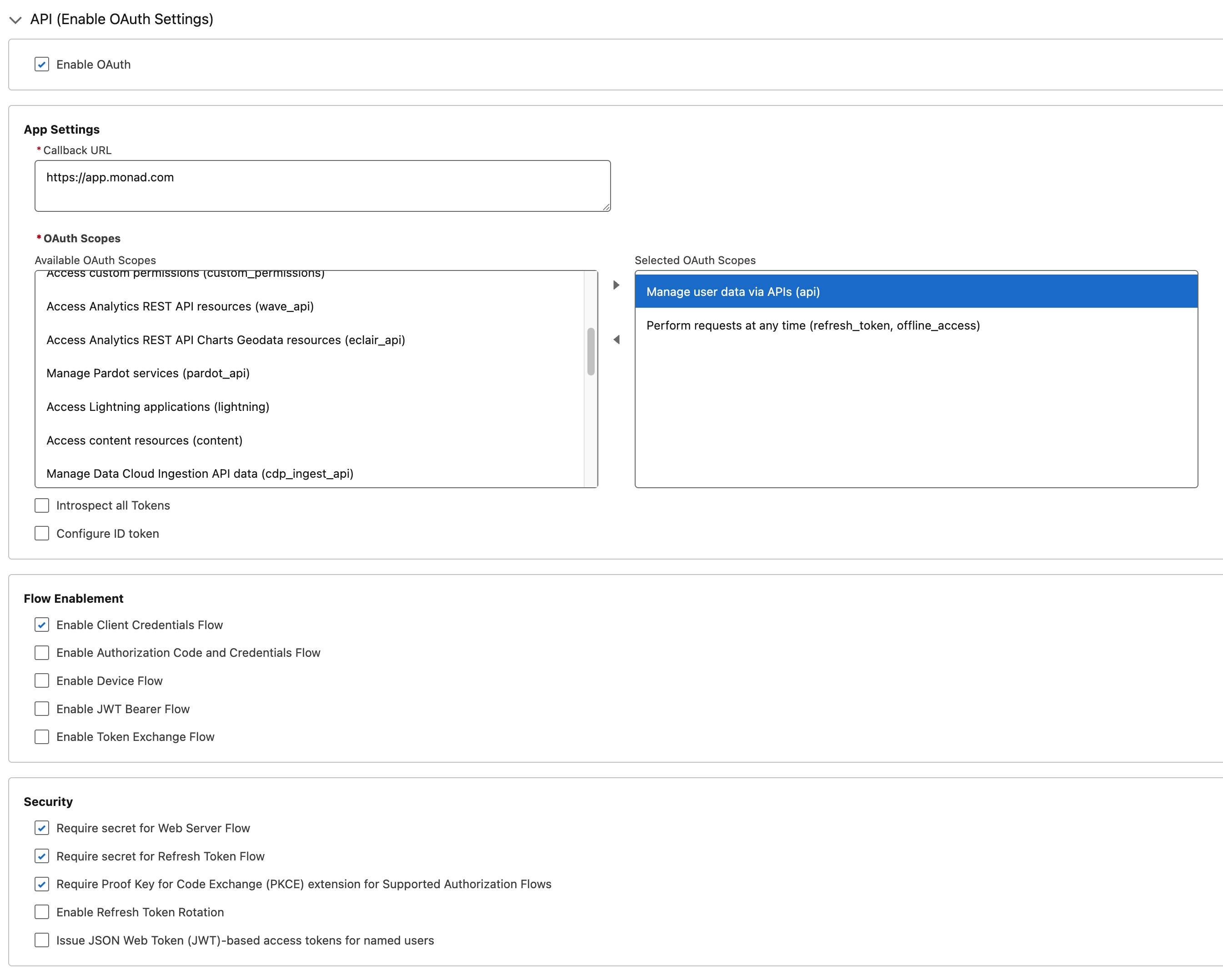
5. In **API (Enable OAuth Settings)** section:
- Check **Enable OAuth**
- **Callback URL**: `https://app.monad.com`
- This can be anything and is not used. It is required by Salesforce.
- **OAuth Scopes**: Add the following scopes:
- `Manage user data via APIs (api)`
- `Perform requests at any time (refresh_token, offline_access)`
6. Enable **Enable Client Credentials Flow**
7. All other settings can be left as default
8. Click **Create**
### Step 2: Configuring OAuth Policies
1. Log in to your Salesforce account
2. Navigate to **Setup** > **Apps** > **External Client Apps** > **External Client App Manager**
3. Click **New External Client App** on the top right
4. Fill in **Basic Information** section:
- **External Client App Name**: Your App Name. E.g., "Monad Salesforce PubSub"
- **Contact Email**: Your email address
- **Distribution State**: Leave as default "local"
5. In **API (Enable OAuth Settings)** section:
- Check **Enable OAuth**
- **Callback URL**: `https://app.monad.com`
- This can be anything and is not used. It is required by Salesforce.
- **OAuth Scopes**: Add the following scopes:
- `Manage user data via APIs (api)`
- `Perform requests at any time (refresh_token, offline_access)`
6. Enable **Enable Client Credentials Flow**
7. All other settings can be left as default
8. Click **Create**
### Step 2: Configuring OAuth Policies
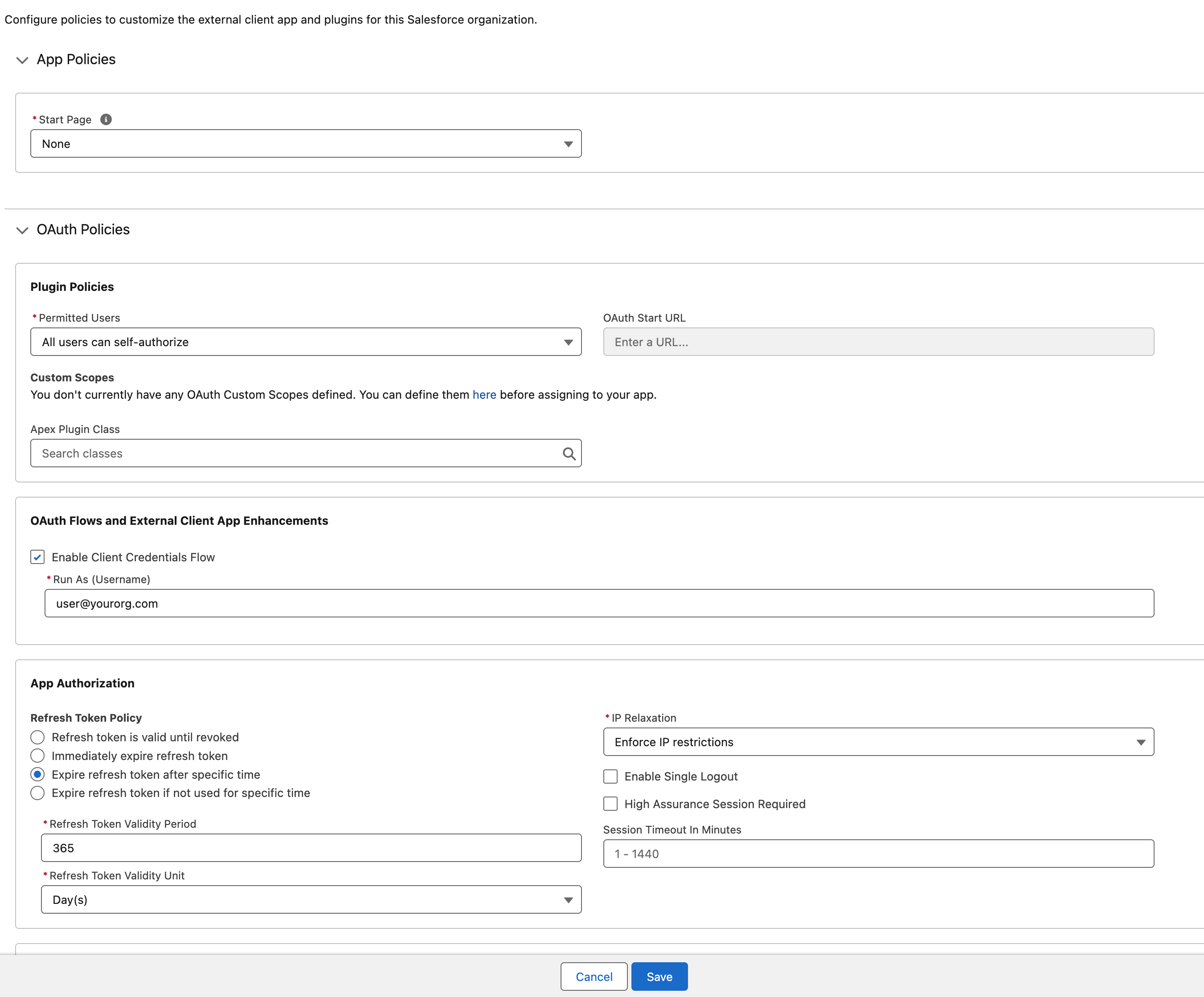 1. After creating the app, you will be redirected to the app's detail page
2. Click **Edit** on the top right
3. In the **OAuth Policies** section:
- Enable **Enable Client Credentials Flow**
- Set **Run As** to an appropriate user with access to the PubSub channel
4. All other settings can be left as default
5. Click **Save**
### Step 3: Retrieving Client Credentials
1. From the new External Client App's detail page, navigate to **Settings** > **OAuth Settings**
2. Click **Consumer Key and Secret**
- Verification may be required before viewing the secrets
3. Copy the **Consumer Key** and **Consumer Secret**.
- These will be used as the Client ID and Client Secret in the input configuration.
## Configuration
### Required Settings
| Setting | Type | Description | How to Find |
|---------|------|-------------|-------------|
| **DomainURL** | string | Domain URL for your Salesforce instance | **Setup** > **Company Settings** > **My Domain** → **Current My Domain URL** |
| **OrganizationID** | string | Organization ID for your Salesforce instance | **Setup** > **Company Settings** > **Company Information** → **Salesforce.com Organization ID** |
| **Topic** | string | Pub/Sub topic to subscribe to | **Setup** > **Events** > **Event Manager** > **Subscription Channel** |
### Required Secrets
| Secret | Description |
|-----------|-------------|
| **Client ID** | OAuth Client ID from the External Client App (Consumer Key) |
| **Client Secret** | OAuth Client Secret from the External Client App (Consumer Secret) |
## Technical Details
### API Integration
This input uses the [Salesforce Pub/Sub API](https://developer.salesforce.com/docs/platform/pub-sub-api/overview) via GRPC endpoints:
- **Primary Method**: `Subscribe` - Consumes events from the subscription channel
- **Supporting Methods**:
- `GetTopic` - Verifies topic accessibility and configuration
- `GetSchema` - Retrieves the schema for message decoding
### Authentication & Rate Limiting
- **Authentication**: OAuth 2.0 Client Credentials flow
- **Rate Limiting**: Automatically respects Salesforce's API rate limits
- **Connection Management**: Maintains persistent GRPC streaming connections
## Troubleshooting
### Common Issues
1. **No Events Returned**
- Check that the channel has streaming enabled in **Setup** > **Events** > **Event Manager**
2. **Missing Events or Gaps in Events**
- Ensure the channel has storage enabled to retain events in **Setup** > **Events** > **Event Manager**
3. **Authentication Errors**
- Verify **Enable Client Credentials Flow** is enabled in both the External Client App Settings and OAuth Policies
## Related Articles
- [Salesforce Pub/Sub API Documentation](https://developer.salesforce.com/docs/platform/pub-sub-api/references/methods/getschema-rpc.html)
- [Salesforce GRPC AVRO Schema](https://developer.salesforce.com/docs/platform/pub-sub-api/guide/grpc-api.html)
- [Salesforce Protobuf](https://github.com/forcedotcom/pub-sub-api/blob/main/pubsub_api.proto)
1. After creating the app, you will be redirected to the app's detail page
2. Click **Edit** on the top right
3. In the **OAuth Policies** section:
- Enable **Enable Client Credentials Flow**
- Set **Run As** to an appropriate user with access to the PubSub channel
4. All other settings can be left as default
5. Click **Save**
### Step 3: Retrieving Client Credentials
1. From the new External Client App's detail page, navigate to **Settings** > **OAuth Settings**
2. Click **Consumer Key and Secret**
- Verification may be required before viewing the secrets
3. Copy the **Consumer Key** and **Consumer Secret**.
- These will be used as the Client ID and Client Secret in the input configuration.
## Configuration
### Required Settings
| Setting | Type | Description | How to Find |
|---------|------|-------------|-------------|
| **DomainURL** | string | Domain URL for your Salesforce instance | **Setup** > **Company Settings** > **My Domain** → **Current My Domain URL** |
| **OrganizationID** | string | Organization ID for your Salesforce instance | **Setup** > **Company Settings** > **Company Information** → **Salesforce.com Organization ID** |
| **Topic** | string | Pub/Sub topic to subscribe to | **Setup** > **Events** > **Event Manager** > **Subscription Channel** |
### Required Secrets
| Secret | Description |
|-----------|-------------|
| **Client ID** | OAuth Client ID from the External Client App (Consumer Key) |
| **Client Secret** | OAuth Client Secret from the External Client App (Consumer Secret) |
## Technical Details
### API Integration
This input uses the [Salesforce Pub/Sub API](https://developer.salesforce.com/docs/platform/pub-sub-api/overview) via GRPC endpoints:
- **Primary Method**: `Subscribe` - Consumes events from the subscription channel
- **Supporting Methods**:
- `GetTopic` - Verifies topic accessibility and configuration
- `GetSchema` - Retrieves the schema for message decoding
### Authentication & Rate Limiting
- **Authentication**: OAuth 2.0 Client Credentials flow
- **Rate Limiting**: Automatically respects Salesforce's API rate limits
- **Connection Management**: Maintains persistent GRPC streaming connections
## Troubleshooting
### Common Issues
1. **No Events Returned**
- Check that the channel has streaming enabled in **Setup** > **Events** > **Event Manager**
2. **Missing Events or Gaps in Events**
- Ensure the channel has storage enabled to retain events in **Setup** > **Events** > **Event Manager**
3. **Authentication Errors**
- Verify **Enable Client Credentials Flow** is enabled in both the External Client App Settings and OAuth Policies
## Related Articles
- [Salesforce Pub/Sub API Documentation](https://developer.salesforce.com/docs/platform/pub-sub-api/references/methods/getschema-rpc.html)
- [Salesforce GRPC AVRO Schema](https://developer.salesforce.com/docs/platform/pub-sub-api/guide/grpc-api.html)
- [Salesforce Protobuf](https://github.com/forcedotcom/pub-sub-api/blob/main/pubsub_api.proto)