# Monad Alerts
Receives alert events fired from your configured Monad alert rules, enabling you to load them into any destination — SIEMs, ticketing systems, Slack, PagerDuty, or custom webhooks.
## Overview
Every alert that fires — or resolves — from your configured alert rules is received by this input as a record in your pipeline. You can:
- **Route by severity** — send `critical` alerts to PagerDuty and `low` alerts to a log archive.
- **Route by alert type** — send pipeline health alerts to your oncall monitoring system and billing alerts to your finance team's Slack channel.
- **Audit** — store all fired alerts in long-term storage for compliance purposes.
## Requirements
- You must have an active Monad organization.
- At least one alert rule must be configured in your organization. See [Alerts](/docs/components/alerts) for available alert types and how to configure them.
## Configuration
This input requires no configuration — it is automatically scoped to your organization and requires no credentials.
## Record Structure
Each record emitted by this input is a JSON object representing a fired or resolved alert. The top-level fields are consistent across all alert types; the `metadata` field contains alert-type-specific detail.
### Top-Level Fields
| Field | Type | Description |
|-------|------|-------------|
| `id` | string | Unique identifier for this alert event |
| `name` | string | Human-readable name from the alert rule |
| `organization_id` | string | ID of the Monad organization that owns this alert |
| `rule_id` | string | ID of the alert rule that triggered this event |
| `rule_type` | string | Alert type identifier (e.g. `error-rate-alert`, `threshold-alert`) |
| `severity` | string | Severity level: `critical`, `high`, `medium`, `low`, or `info` |
| `description` | string | Human-readable description of what triggered the alert |
| `metadata` | object | Alert-type-specific fields — structure varies by `rule_type` |
| `resource` | object | The resource (pipeline, node, or org) that triggered the alert |
| `created_at` | integer | Unix timestamp (seconds) when the alert was created |
| `status` | object | Lifecycle state of the alert |
### `resource` Object
| Field | Type | Description |
|-------|------|-------------|
| `resource_type` | string | Type of resource: `pipeline`, `node`, or `organization` |
| `resource_id` | string | ID of the resource |
| `parent_type` | string | (optional) Parent resource type, e.g. `pipeline` if resource is a node |
| `parent_id` | string | (optional) ID of the parent resource |
### `status` Object
| Field | Type | Description |
|-------|------|-------------|
| `state` | string | `FIRING` or `RESOLVED` |
| `resolved_at` | integer | Unix timestamp when the alert resolved (only present on resolved alerts) |
| `clearing_started_at` | integer | Unix timestamp when the clearing process began |
For the fields each alert type populates in `metadata`, see the [Alerts](/docs/components/alerts) documentation.
## Sample Record
The example below shows a `threshold-alert` firing when egress bytes drop below an expected minimum, indicating a stalled pipeline.
```json
{
"id": "a1b2c3d4-0000-0000-0000-000000000001",
"name": "Egress Stall — SIEM Export",
"organization_id": "fd347096-5f84-4e9c-9ca8-633d22757e38",
"rule_id": "5da557a4-0093-486c-9987-1a7121eaaab9",
"rule_type": "threshold-alert",
"severity": "high",
"description": "Pipeline pipe-siem less than threshold of 1000000 for metric 'egress_bytes' (current value: 0.00)",
"resource": {
"resource_type": "pipeline",
"resource_id": "543b3cca-d553-40c1-8bea-5f77e93e6f61"
},
"metadata": {
"pipeline_id": "pipe-siem",
"value": 0,
"threshold": 1000000,
"operator": "less_than",
"metric_name": "egress_bytes",
"time_window": "5m"
},
"created_at": 1743389400,
"status": {
"state": "FIRING"
}
}
```
When the condition clears, the same record is re-published with `status.state` set to `RESOLVED` and the resolution timestamps populated:
```json
{
"id": "a1b2c3d4-0000-0000-0000-000000000002",
"name": "Egress Stall — SIEM Export",
"organization_id": "fd347096-5f84-4e9c-9ca8-633d22757e38",
"rule_id": "5da557a4-0093-486c-9987-1a7121eaaab9",
"rule_type": "threshold-alert",
"severity": "high",
"description": "Pipeline pipe-siem less than threshold of 1000000 for metric 'egress_bytes' (current value: 0.00)",
"resource": {
"resource_type": "pipeline",
"resource_id": "543b3cca-d553-40c1-8bea-5f77e93e6f61"
},
"metadata": {
"pipeline_id": "pipe-siem",
"value": 0,
"threshold": 1000000,
"operator": "less_than",
"metric_name": "egress_bytes",
"time_window": "5m"
},
"created_at": 1743389400,
"status": {
"state": "RESOLVED",
"resolved_at": 1743391200,
"clearing_started_at": 1743390900
}
}
```
## Routing Alerts to Different Destinations
To send different alerts to different destinations, create multiple outgoing edges from the Monad Alerts input node, each with its own conditions. See [Data Routing](/docs/components/routing) for a full explanation of how edges and conditions work.
### Route by Severity
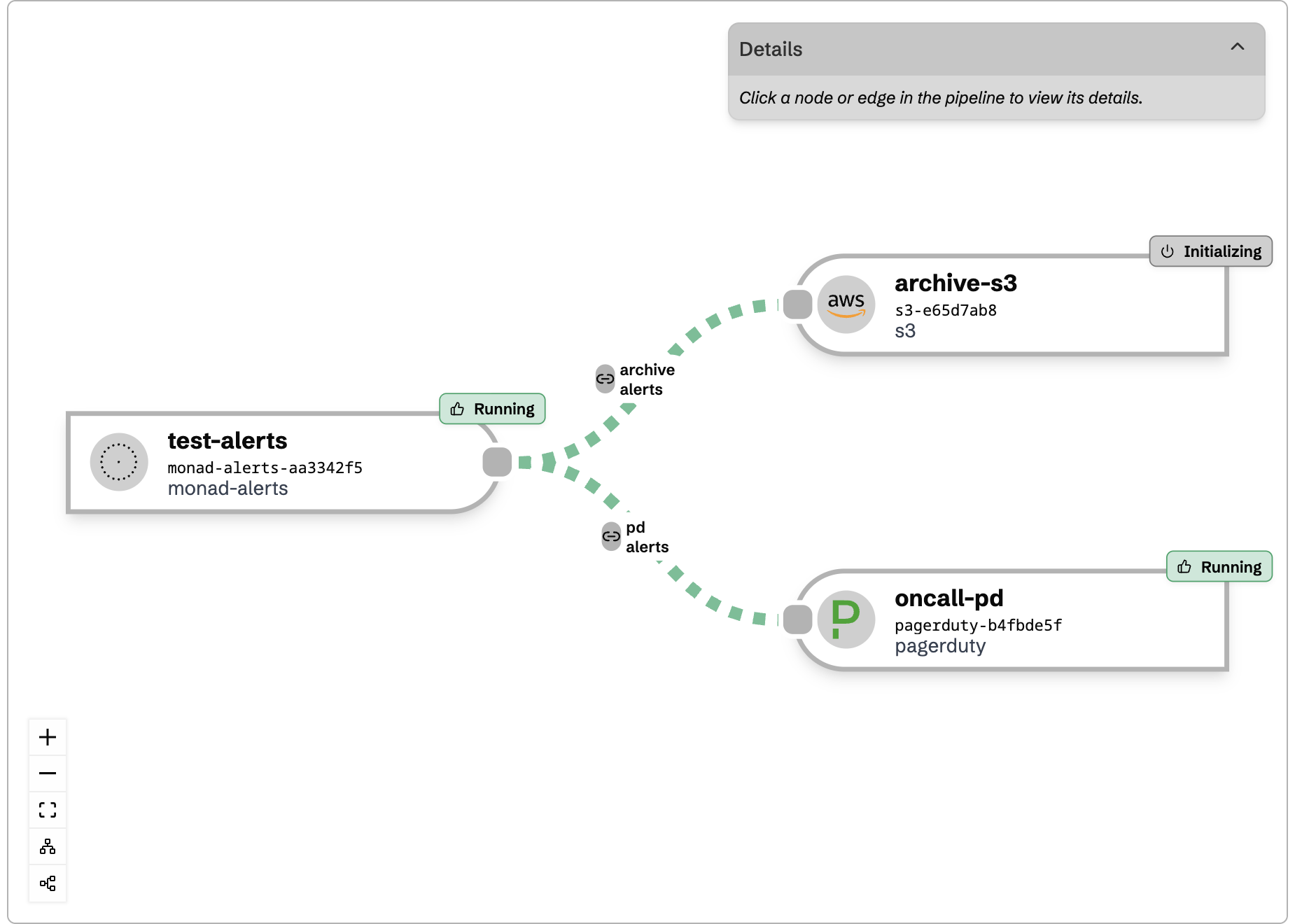
Create two edges — one for high-priority destinations and one for archival:
**Edge to PagerDuty** — matches critical and high severity:
```json
{
"operator": "or",
"conditions": [
{ "type_id": "equals", "config": { "key": "severity", "value": "critical" } },
{ "type_id": "equals", "config": { "key": "severity", "value": "high" } }
]
}
```
**Edge to log archive** — matches everything else:
```json
{
"operator": "or",
"conditions": [
{ "type_id": "equals", "config": { "key": "severity", "value": "medium" } },
{ "type_id": "equals", "config": { "key": "severity", "value": "low" } },
{ "type_id": "equals", "config": { "key": "severity", "value": "info" } }
]
}
```
 ### Route by Alert Type
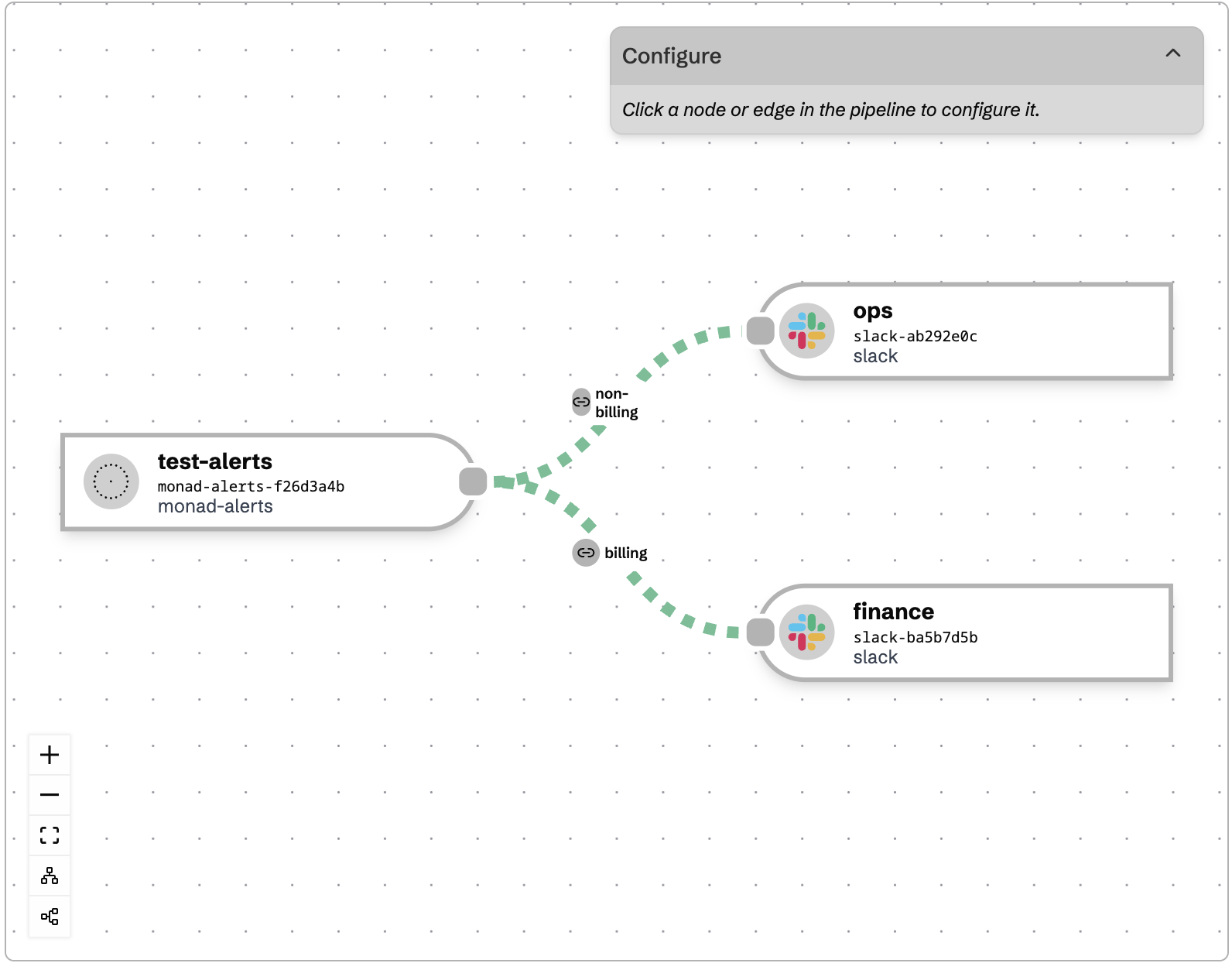
Send operational alerts to your ops team and billing alerts to finance:
**Edge to ops Slack:**
```json
{
"operator": "or",
"conditions": [
{ "type_id": "equals", "config": { "key": "rule_type", "value": "error-rate-alert" } },
{ "type_id": "equals", "config": { "key": "rule_type", "value": "threshold-alert" } },
{ "type_id": "equals", "config": { "key": "rule_type", "value": "pipeline-status-alert" } },
{ "type_id": "equals", "config": { "key": "rule_type", "value": "volume-anomaly-alert" } }
]
}
```
**Edge to finance Slack:**
```json
{
"operator": "and",
"conditions": [
{ "type_id": "equals", "config": { "key": "rule_type", "value": "billing-metrics-cost-budget" } }
]
}
```
### Route by Alert Type
Send operational alerts to your ops team and billing alerts to finance:
**Edge to ops Slack:**
```json
{
"operator": "or",
"conditions": [
{ "type_id": "equals", "config": { "key": "rule_type", "value": "error-rate-alert" } },
{ "type_id": "equals", "config": { "key": "rule_type", "value": "threshold-alert" } },
{ "type_id": "equals", "config": { "key": "rule_type", "value": "pipeline-status-alert" } },
{ "type_id": "equals", "config": { "key": "rule_type", "value": "volume-anomaly-alert" } }
]
}
```
**Edge to finance Slack:**
```json
{
"operator": "and",
"conditions": [
{ "type_id": "equals", "config": { "key": "rule_type", "value": "billing-metrics-cost-budget" } }
]
}
```
 ### Filter to a Specific Pipeline
Only forward alerts that concern a specific pipeline:
```json
{
"operator": "and",
"conditions": [
{ "type_id": "equals", "config": { "key": "resource.resource_id", "value": "pipe-xyz" } }
]
}
```
### Only Process FIRING Alerts
Skip resolved events when your destination handles state tracking itself:
```json
{
"operator": "and",
"conditions": [
{ "type_id": "equals", "config": { "key": "status.state", "value": "FIRING" } }
]
}
```
### Combine Multiple Conditions
Route only firing high-severity alerts to your on-call system by nesting conditions:
```json
{
"operator": "and",
"conditions": [
{
"operator": "or",
"conditions": [
{ "type_id": "equals", "config": { "key": "severity", "value": "critical" } },
{ "type_id": "equals", "config": { "key": "severity", "value": "high" } }
]
},
{ "type_id": "equals", "config": { "key": "status.state", "value": "FIRING" } }
]
}
```
## Deduplication Behavior
Once an alert fires for a given rule and resource, it will not re-fire for that same combination for at least one hour. When the underlying condition clears, a `RESOLVED` event is published. Your downstream systems will not receive repeated alerts for the same ongoing issue.
If your destination uses its own deduplication key (e.g. PagerDuty's `dedup_key`), use `.rule_id + "-" + .resource.resource_id` to align with Monad's deduplication behavior.
## Related Documentation
- [Alerts](/docs/components/alerts) — Available alert types, configuration options, and the metadata fields each one populates
- [Data Routing](/docs/components/routing) — How to configure edges and conditions to route records between nodes
- [Conditionals Reference](/docs/components/conditionals) — Full reference for all condition types available in edge routing
### Filter to a Specific Pipeline
Only forward alerts that concern a specific pipeline:
```json
{
"operator": "and",
"conditions": [
{ "type_id": "equals", "config": { "key": "resource.resource_id", "value": "pipe-xyz" } }
]
}
```
### Only Process FIRING Alerts
Skip resolved events when your destination handles state tracking itself:
```json
{
"operator": "and",
"conditions": [
{ "type_id": "equals", "config": { "key": "status.state", "value": "FIRING" } }
]
}
```
### Combine Multiple Conditions
Route only firing high-severity alerts to your on-call system by nesting conditions:
```json
{
"operator": "and",
"conditions": [
{
"operator": "or",
"conditions": [
{ "type_id": "equals", "config": { "key": "severity", "value": "critical" } },
{ "type_id": "equals", "config": { "key": "severity", "value": "high" } }
]
},
{ "type_id": "equals", "config": { "key": "status.state", "value": "FIRING" } }
]
}
```
## Deduplication Behavior
Once an alert fires for a given rule and resource, it will not re-fire for that same combination for at least one hour. When the underlying condition clears, a `RESOLVED` event is published. Your downstream systems will not receive repeated alerts for the same ongoing issue.
If your destination uses its own deduplication key (e.g. PagerDuty's `dedup_key`), use `.rule_id + "-" + .resource.resource_id` to align with Monad's deduplication behavior.
## Related Documentation
- [Alerts](/docs/components/alerts) — Available alert types, configuration options, and the metadata fields each one populates
- [Data Routing](/docs/components/routing) — How to configure edges and conditions to route records between nodes
- [Conditionals Reference](/docs/components/conditionals) — Full reference for all condition types available in edge routing